

Shopify abandoned cart recovery on WhatsApp is an automatic follow-up with shoppers who reached checkout, entered their phone number and left without ordering. Cartsaver is a Shopify abandoned cart app that does this on WhatsApp: it sends a check-in about an hour later, a second reminder a few hours after that with an optional discount code, and lists every order it wins back.
Free planSet up in about 1 minuteInstall on Shopify(opens in a new tab)
The messages arrive in the chat app shoppers already use every day, and each recovered order is listed with its amount, so you can see exactly what the feature earns. Cart Recovery is one part of a full WhatsApp commerce suite: Cartsaver, a Built for Shopify app by Xtnd, also confirms cash on delivery orders on WhatsApp or SMS before you ship, then uses the same WhatsApp conversation for order updates, one-tap cross-sells, reviews and campaigns, through the official WhatsApp Business API. This guide is for Shopify merchants, especially cash on delivery (COD) stores in Egypt, the Gulf, Pakistan and India, who want to know what Cart Recovery sends, when it sends it, and how to judge whether it is working.
Cart Recovery at a glance
- Who receives it: shoppers who left checkout after giving a phone number and have not placed the order since.
- Channel: WhatsApp only. Recovery messages are not sent by SMS.
- Messages: a check-in about an hour after abandonment, then a second reminder a few hours later for shoppers who still have not ordered.
- Discount: optional, on the second reminder only, applied automatically at checkout.
- Tracking: messages sent, converted orders and recovered revenue on the dashboard, plus a list of every recovered order.
How does WhatsApp cart recovery work?
Cart Recovery sends two WhatsApp messages to shoppers who left checkout after giving a phone number. About an hour after abandonment, a friendly check-in asks whether something went wrong. A few hours later, shoppers who engaged but still have not ordered get a reminder with their saved cart and an optional discount.
Watch the cart recovery walkthrough (Arabic).
1. The check-in: a question, not a hard sell
About an hour after a checkout is abandoned, the shopper receives a WhatsApp message that asks whether something went wrong during checkout and reminds them that their items are still saved. It comes with two buttons: View my items and Contact support.
The question is deliberate. COD shoppers rarely leave because they lost interest. More often they hesitated over the shipping fee, wanted to know the delivery time, or wondered whether they can open the parcel before paying. A question invites them to say so, and a single answer from your team often saves the sale. When the shopper taps View my items (or a while after they tap Contact support), Cartsaver sends the products they left behind with a nudge to finish the order.
2. The second reminder, with an optional discount
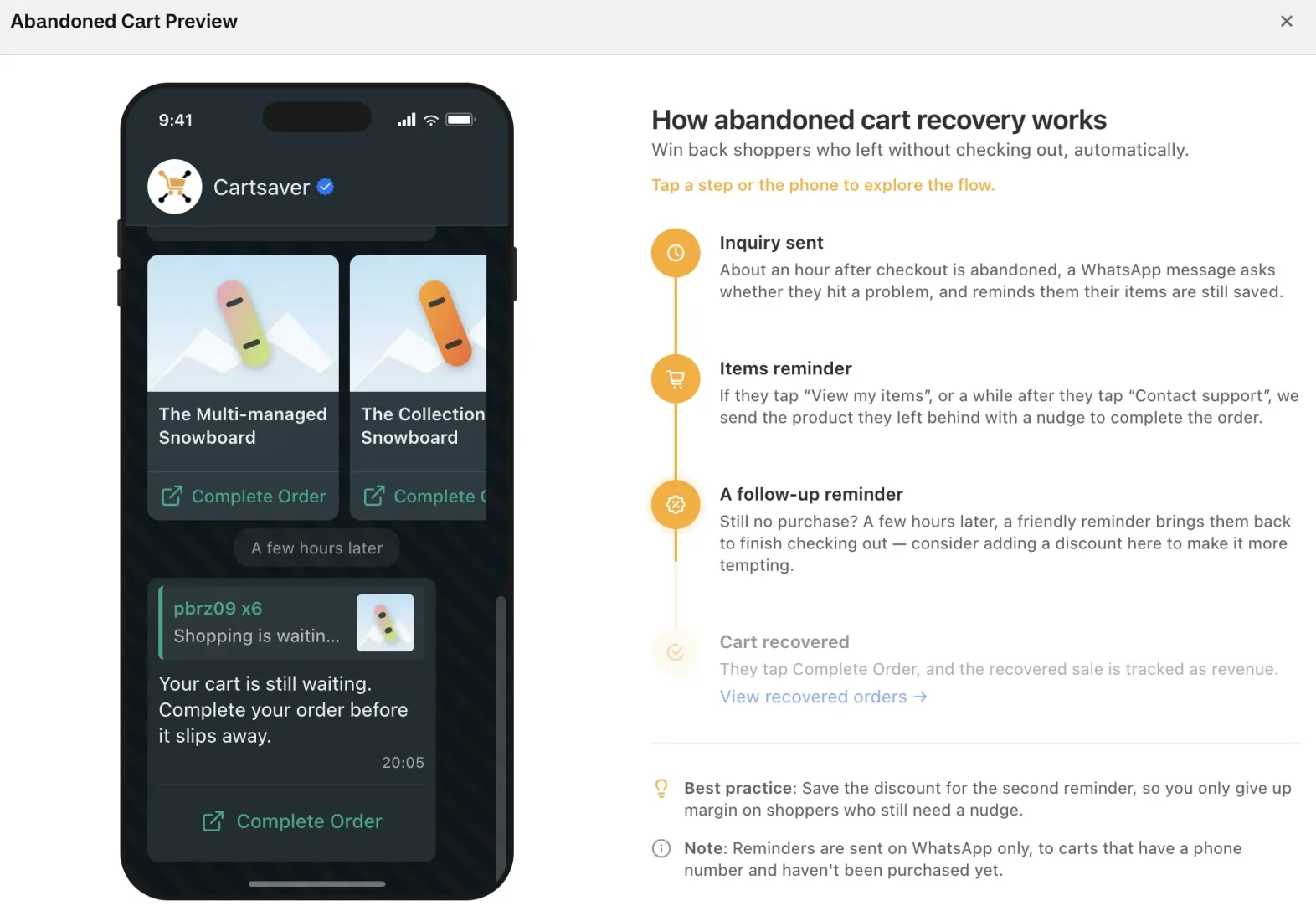
If the shopper engaged with the check-in but still has not ordered, Cartsaver sends a second reminder a few hours later. It shows the saved products and a Complete Order button that takes them straight back to checkout with the cart restored.
This is the only message that can carry a discount. You add a promo code, choose a percentage or a fixed amount, and the code is applied automatically when the shopper returns to checkout. Keeping the discount for the second message means you only give up margin on shoppers who needed the extra push, not on the ones who would have come back anyway.
WhatsApp abandoned cart message examples
Here is what a shopper called Mariam receives after leaving two items at checkout, using Cartsaver’s default messages as they appear in the app’s Preview. Messages go out in English or Arabic, following the shopper’s checkout language. The check-in uses the WhatsApp template approved for your sender, so its exact wording can differ slightly.
1. The check-in, about an hour after checkout, with the buttons View my items and Contact support:
Hi Mariam,
Did you face any issue during checkout at [your store]?
Your (2) item(s) are still saved.
2. The items message, sent when she taps View my items, followed by a card for each product with a Complete Order button:
Shopping is waiting for you!
Your favorite products are still available
You still have 2 products in your cart
Order now and enjoy
3. The second reminder, a few hours later, here with a 10% discount and a Complete Order button that reopens her checkout with the code applied:
10% Discount is yours, but only if you complete your order now.
This discount disappears once this offer expires.
Without a discount, the second reminder simply tells the shopper the items are still waiting and asks them to complete the order.
What the video covers
- 0:00 Intro and setup: switch on Abandoned Cart in Cartsaver, and it starts following up on WhatsApp with shoppers who left checkout after entering a phone number.
- 0:19 The first reminder: about an hour later the shopper gets a check-in message; tapping View my items sends back the products they left.
- 0:30 The second reminder: shoppers who engaged but still have not ordered get their saved products with a Complete Order button.
- 0:43 Adding a discount code: add a percentage or fixed-amount promo code to the second reminder. Create the same code first in Shopify admin as an "Amount off order" discount, or it is not applied.
Timing: why an hour, why later, and why not at night
Cartsaver sets the timing for you. There are no delays to tune, which keeps setup to a single switch. Here is the reasoning behind the defaults:
- About one hour for the check-in. Long enough to skip shoppers who just stepped away to find their wallet or ask a family member, short enough that the product is still on their mind.
- A few hours later for the reminder. The second message is spaced out so it reads as a reminder, not pressure. It is sent while WhatsApp still allows a follow-up to someone who recently interacted with your business.
- Quiet hours overnight. The second reminder is held during the night (by default 1 am to 9 am) in the shopper's local time, worked out from their phone number's country. A shopper in Riyadh and a shopper in Lahore each get it at a reasonable hour.
- The shopper's language. Messages follow the shopper's checkout language, or always go out in English or Arabic if you set that in Cartsaver.
Why does WhatsApp work for COD abandoned carts?
A cash on delivery checkout collects a phone number, not a card, and in Egypt, Saudi Arabia, the UAE, Pakistan and India that number is usually on WhatsApp. Shoppers there already message stores on WhatsApp, so a recovery message with product images and a checkout button feels like service, not an ad.
A COD checkout asks for a name, an address and a phone number, not a card. That phone number is the one reliable way back to the shopper, and in Egypt, Saudi Arabia, the UAE, Pakistan and India it is usually a WhatsApp number. Shoppers in these markets already message stores on WhatsApp to ask about sizes, delivery and payment, so a recovery message there feels like the store reaching out, not an ad.
WhatsApp also lets the message do more than a plain text can: product images, a saved cart, and buttons that open checkout or start a conversation with your team. Cartsaver sends through Meta's official WhatsApp Business API, so you are not risking your number on an unofficial tool. Read why the official WhatsApp API protects your business number if you are comparing options.
How does Cartsaver know a cart was recovered?
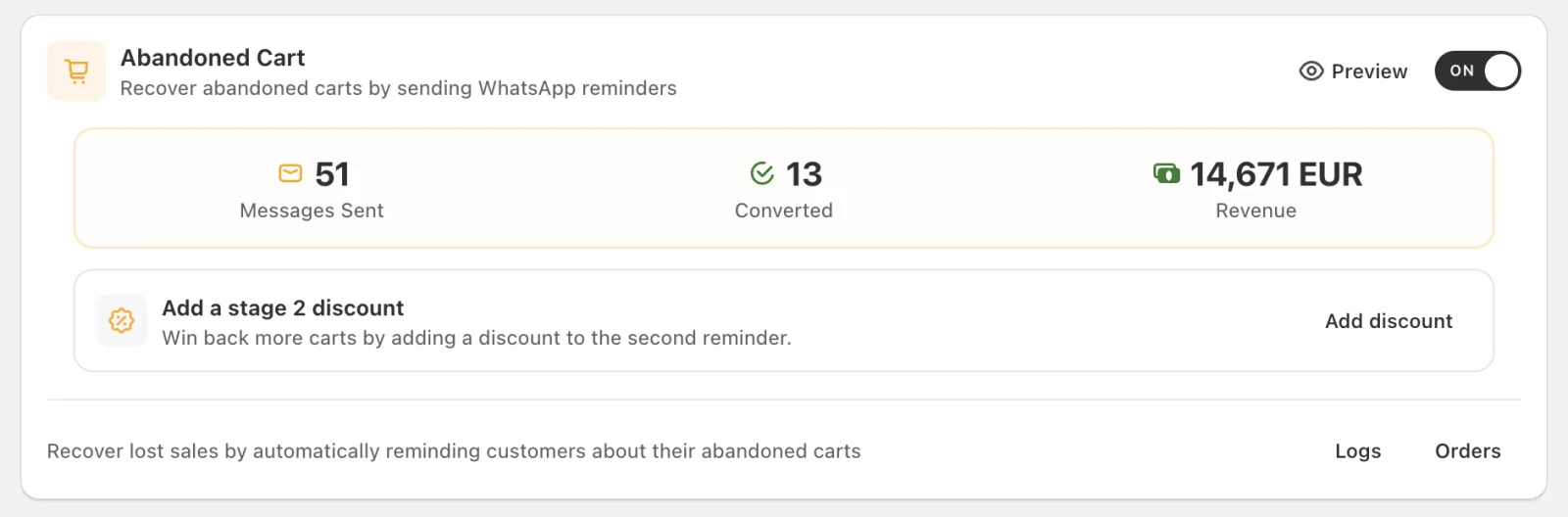
An order counts as recovered when the shopper places it within 7 days of the last recovery message. Cartsaver then shows it in the Recovered Orders list with its order number and amount, and adds it to the converted orders and recovered revenue figures on the Abandoned Cart card. Measured this way, the 10 Cartsaver stores with the most recovered checkouts recovered 19% of their reminded carts: see the abandoned cart recovery rate case study.
You do not have to guess whether Cart Recovery pays for itself. Cartsaver records:
- The Abandoned Cart card: messages sent, converted orders and recovered revenue for the last 12 months.
- The Recovered Orders list: each recovered order with its order number, contact, amount, the last message sent and when it was recovered.
- The rule for "recovered": an order counts when the shopper places it within 7 days of the last recovery message.
- Message logs: every abandoned cart message with its delivery status, in the Logs page. Our guide to reading your Cartsaver logs shows how to spot numbers that never received a message.
Plans and recovery limits
Cart Recovery is on every plan. Free, Advanced and Unlimited cap the number of recovered carts per 30-day billing cycle (messages that do not lead to an order do not count toward the cap). Scale, Ultra and Elite have no cap.
| Plan | Price | Recovered carts per cycle |
| Free | $0 | 10 |
| Advanced | $9.99/month | 20 |
| Unlimited | $29.99/month | 40 |
| Scale | $79.99/month | Unlimited |
| Ultra | $159.99/month | Unlimited |
| Elite | $349.99/month | Unlimited |
Cartsaver warns you as you approach the cap. When it is reached, recovery pauses until the next cycle. Compare everything each plan includes on the Cartsaver pricing table.
Turning it on
- Open Cartsaver in your Shopify admin and switch on the Abandoned Cart card.
- Optional: add a second-reminder discount. Create the code first in Shopify admin, Discounts as an "Amount off order" discount, then enter the same code and amount in Cartsaver.
- Open the preview to see the check-in, the items message and the reminder as a shopper will.
- Test it: from a guest browser, add a product, go to checkout, enter your own WhatsApp number and close the tab. The check-in should arrive about an hour later.
For the on/off switch, the second-reminder discount, quiet hours and plan limits, see the abandoned cart recovery settings in the Cartsaver docs.
Common mistakes
- A promo code that does not exist in Shopify. Cartsaver applies the code at checkout, but Shopify has to know it. Create it as an "Amount off order" discount, or nothing is applied.
- Discounting too early. The discount only goes on the second reminder by design. Shoppers who return after the friendly check-in pay full price.
- Ignoring the Contact support replies. The check-in is built to start conversations. If nobody answers, you lose the shoppers who were closest to buying.
- Forgetting that a recovered COD order is still a COD order. It arrives as a normal Shopify order, so if you use one-tap WhatsApp Order Verification, the customer confirms it like any other order before you ship.
- Running out of recoveries mid-cycle. If you regularly hit the cap on Advanced or Unlimited, the missed recoveries usually cost more than the upgrade to Scale.
A worked example
Mariam is shopping on a Cairo fashion store at 8:40 pm. She adds a dress and a bag, reaches checkout, enters her address and WhatsApp number, then leaves to check whether she can open the parcel before paying. At about 9:40 pm she receives the check-in. She taps Contact support and asks her question; the store's team replies that she can. Later, Cartsaver sends her saved items. She still does not order that night.
The second reminder becomes due in the early hours, so Cartsaver holds it until morning. At 9 am Mariam sees her two items with a 10% code and a Complete Order button. She taps it, the code is already applied, and she places the order. It appears in the store's Recovered Orders list with its amount, and the confirmation message for the new order follows in the same WhatsApp chat.
If you also want fewer carts abandoned in the first place, pair recovery with a shorter checkout: Fast Checkout, the one-page COD order form, cuts the steps between product page and order. See all of Cart Recovery's features on the homepage.
Frequently asked questions
Does Cartsaver send abandoned cart reminders by SMS?
No. Cart Recovery sends on WhatsApp only, because the messages rely on product images and buttons. SMS is available in Cartsaver for verification codes and order updates.
Which abandoned carts get a WhatsApp message?
Carts where the shopper reached checkout (or verified their number) and gave a phone number, and has not placed the order since. Without a phone number there is no one to message.
Can I change when the reminders are sent?
Not at the moment. Cartsaver sends the check-in about an hour after abandonment and the second reminder a few hours later, and holds the reminder overnight in the shopper's local time. You control whether recovery is on and whether the second reminder carries a discount.
How does Cartsaver decide an order was recovered?
An order counts as recovered when the shopper places it within 7 days of the last recovery message. Recovered orders appear in the Recovered Orders list and in the revenue figure on your dashboard.
Is abandoned cart recovery included on the Free plan?
Yes. Every plan includes Cart Recovery. Free covers 10 recovered carts per cycle, Advanced covers 20, Unlimited covers 40, and Scale, Ultra and Elite have no limit.