

Ramadan and Eid WhatsApp marketing for Shopify means sending Ramadan greetings, gift ideas, Eid outfit picks and last-order reminders to Shopify customer segments on WhatsApp, timed to each stage of the holy month, then measuring the orders they bring in. In Cartsaver you start from ready-made Ramadan and Eid templates, schedule each message and see its estimated cost before launch.
This guide is for Shopify merchants planning Ramadan 2027, Eid al-Fitr (Lebaran in Indonesia) and Eid al-Adha, in the Gulf, Egypt, Indonesia or anywhere their customers celebrate. Cartsaver is a Built for Shopify app by Xtnd that confirms cash on delivery orders on WhatsApp or SMS before you ship, then uses the same WhatsApp conversation for order updates, abandoned cart recovery, one-tap cross-sells, reviews and campaigns, through the official WhatsApp Business API. For the full feature, see WhatsApp marketing for Shopify.
When are Ramadan and Eid in 2027?
Ramadan 2027 is expected to begin around Monday 8 February 2027, Eid al-Fitr to fall on 9 or 10 March 2027, and Eid al-Adha on 16 or 17 May 2027. These are astronomical estimates: the official dates depend on the sighting of the new moon and on each country’s announcement, so they can differ by a day between markets.
| Moment | Expected dates (2027) | What to plan for |
| Before Ramadan | Late January to about 7 February | Preparation shopping: home, hosting, family gatherings |
| First ten days of Ramadan | About 8 to 17 February | Greetings, evening offers, gift ideas |
| Last ten days of Ramadan | About 27 February to 8 March | Eid outfits and gifts, last order date for delivery before Eid |
| Eid al-Fitr | 9 or 10 March | Eid greeting and a thank-you to customers who ordered |
| Eid al-Adha | 16 or 17 May (the day of Arafah is the day before) | A second, shorter Eid sequence |
Build your schedule on the estimated dates now, and move each send by a day once your country confirms the start of Ramadan and the day of Eid.
What Ramadan and Eid WhatsApp templates does Cartsaver include?
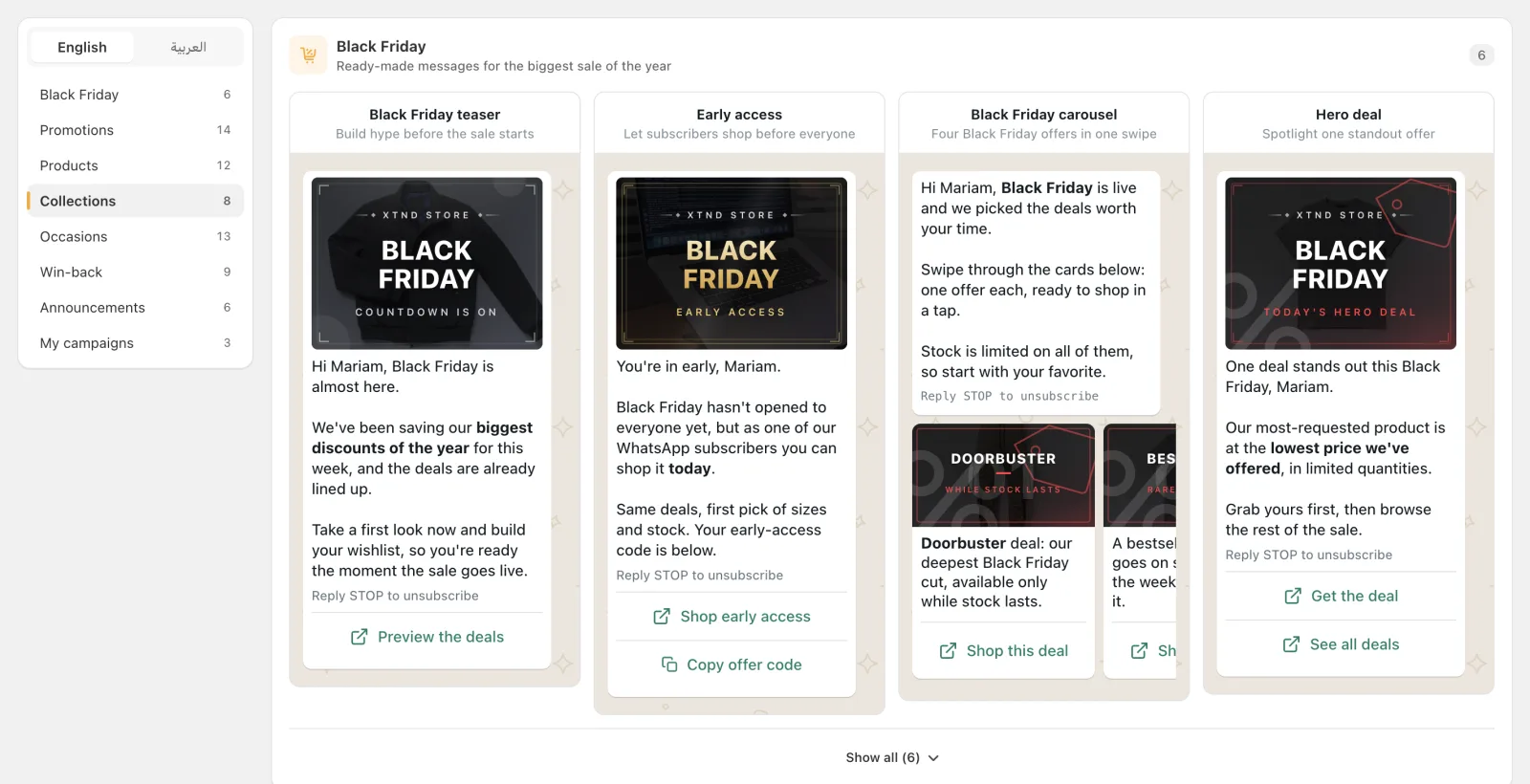
The template library’s Occasions category has a Ramadan template, an Eid template and two carousels made for the season: Gift picks and Celebration looks. Each comes in English and Arabic with a ready-made banner. The Ramadan banner reads “Ramadan Kareem” (رمضان كريم) and the Eid banner “Eid Mubarak” (عيد مبارك).
| Template | What it says | Format and buttons |
| Ramadan | A Ramadan greeting and a special collection and offers for the holy month, from family gatherings to Eid preparations | Single message, one store link (“Explore Ramadan offers”) |
| Gift picks carousel | Gifts sorted by person: the one who has everything, the practical one, the treat-yourself type and the safe bet | Carousel of four cards, a “See the gift” button on each |
| Celebration looks carousel | A styled look for everyone at the table: the host, the guest, the kids and the home | Carousel of four cards, a “See the look” button on each |
| Eid | An Eid greeting with gifts and looks for the whole family, and a reminder to order so it arrives before the celebrations | Single message, one store link (“Shop the Eid edit”) |
The Ramadan and Eid templates insert the customer’s first name. The Eid template is a general Eid greeting, so you can use it for Eid al-Fitr and again for Eid al-Adha. Store links and promo codes are left empty for you to fill in, and Cartsaver won’t submit the campaign until they are. Campaigns are written in English or Arabic, and you can edit any template’s text before you submit it.
Other categories fill the gaps in a Ramadan sequence: VIP exclusive (early access with a copy-code button), Free shipping, Payday offer, Gift guide, Last chance and Sale extended.
How do I plan Ramadan WhatsApp campaigns stage by stage?
Plan Ramadan as four short stages, not one blast: a greeting before the month starts, light offers in the first ten days, Eid outfits and gifts in the last ten days with a clear last order date, and an Eid greeting. Send each message to the segment most likely to act on it, at the hour your customers are on their phones.
- Before Ramadan (late January to about 7 February): Ramadan template. Greet loyal and recent buyers and link to your Ramadan collection: home, hosting and kitchen items, or whatever your customers buy to prepare.
- First ten days (about 8 to 17 February): Gift picks carousel or Free shipping. Keep it light: one useful offer, scheduled for the evening rather than during fasting hours.
- Last ten days (about 27 February to 8 March): Celebration looks carousel, then the Eid template. This is when Eid outfits and gifts are bought. Send the carousel early in the last ten days, and the Eid template with your last order date for delivery before Eid a few days later.
- Last order day: Last chance, edited to say the order cut-off for Eid delivery, to customers who received earlier messages and have not ordered.
- Eid al-Fitr (9 or 10 March): Thank you, with a small gift code for customers who ordered during Ramadan.
- Eid al-Adha (16 or 17 May): the Eid template again, one to two weeks before, with the same last-order-date logic.
You can set each campaign to start as soon as Meta approves it, or schedule a date and a half-hour time slot in your local timezone, which lets you send after iftar instead of in the middle of the fasting day. Prepare and submit the whole sequence early, because each message has to pass Meta’s review before it can send, and after you submit, the message text is locked.
What should each Ramadan and Eid message say?
Match each message to what customers are doing at that point in the month: preparing, gifting, dressing for Eid, then celebrating. One clear offer and one link per message works better than a full catalogue.
- Preparation: “Ramadan Kareem, {first name}. Our Ramadan collection for family gatherings is ready.”
- Gifting: gifts sorted by person, so the customer finds one in a swipe.
- Eid outfits: a look for the host, the guest and the kids, with sizes in stock.
- Cut-off: “Order by {date} to receive it before Eid.”
- Eid: a greeting and a thank-you, without a hard sell.
Who should get each Ramadan message?
Use a different audience for each stage. Cartsaver offers four quick audiences (recent buyers, loyal buyers, one-time buyers and lapsed buyers) next to every customer segment you built in Shopify, and shows how many customers in each audience have a phone number, so you know the real reach.
- Loyal and recent buyers suit the Ramadan greeting and early offers.
- Lapsed buyers suit the Celebration looks or Gift picks carousel: Eid is a strong reason to come back.
- A Shopify segment of last Ramadan’s buyers, if you have one, suits the Eid template.
Relevant audiences also protect your sender’s quality rating, which Cartsaver shows as High, Medium or Low. While it is Medium or Low, you cannot submit a campaign, and campaigns that are already sending stop. Over a month-long season, a few well-targeted messages are safer than a message every day.
What are the opt-in and frequency rules?
Send campaigns only to customers who agreed to hear from you on WhatsApp, and keep the number of messages low. Meta requires opt-in, reviews every campaign message as a marketing template, and limits how many marketing messages a sender can deliver per day.
- Opt-in. See Meta’s guide to getting opt-in for WhatsApp and the WhatsApp Business Policy. Customers who reply STOP no longer receive campaigns from your store.
- Meta approval. Every campaign message sends only after Meta approves it. If Meta rejects it, Cartsaver shows the reason so you can edit and resubmit. Meta’s rules are in its template documentation.
- Daily limits. If your sender reaches Meta’s messaging limit, Cartsaver pauses the campaign and resumes it the next day, so for a large list, start the main send early and don’t leave the Eid message to the last day.
- Frequency. Space your stages out and skip customers who just ordered: fewer, relevant messages protect your sender’s quality rating.
How do I handle COD orders in the Eid rush?
Confirm every cash on delivery order on WhatsApp before you ship, act quickly on orders nobody confirms, and tell customers the last order date for delivery before Eid. Orders confirmed early can be packed early; unconfirmed ones should not take a courier slot in the busiest week.
- Confirmation. One-tap WhatsApp order confirmation asks each customer to confirm before you ship.
- Unconfirmed orders. With fake COD order protection, Cartsaver marks orders nobody confirms as high risk or cancels them, after a wait you set from 30 minutes to 24 hours. With Auto Cancel, a shorter wait releases the stock sooner when demand peaks.
- Cut-off. Agree the last order date with your courier, put it in the Eid template and the Last chance message, and show it on your store.
- Updates. Order updates on WhatsApp tell customers when the order ships, so they know it will arrive in time.
What do I need to set up before Ramadan?
Four things: a Scale, Ultra or Elite plan with your own WhatsApp sender connected, the Campaign Tracking app embed turned on in your theme, Meta approval for each campaign message, and your Ramadan and Eid discount codes created in Shopify. Start in January; sender setup and Meta review both take time.
- Plan and sender. Launching campaigns needs the Scale, Ultra or Elite plan and your own WhatsApp Business sender, because marketing messages go out under your brand and number. On Advanced and Unlimited you can build the whole Ramadan sequence and save it as drafts, but you can’t launch it. The sender ID and own WhatsApp number guide explains the options.
- Campaign Tracking. Turn on the Campaign Tracking app embed in your Shopify theme, so Cartsaver can see storefront visits and credit orders to each campaign.
- Meta approval. Submit each stage well before its send date.
- Promo codes. A copy-code button accepts Latin letters and numbers only, with no spaces or symbols, up to 15 characters, for example RAMADAN27 or EID27.
How much does a Ramadan WhatsApp campaign cost?
A campaign has two costs. Meta charges a marketing rate per message that depends on the customer’s country, which you pay to Meta directly. Cartsaver adds a Cartsaver commission per delivered campaign message: $0.01 on Scale and $0 on Ultra and Elite, billed through Shopify. You see an estimated cost before launch.
Cartsaver does not mark up Meta’s message charges. The estimated cost receipt in the editor lists both lines, based on the customers in your audience who have a phone number, so check it for each stage before you submit. Campaigns are sent on WhatsApp today; SMS campaigns are coming soon.
How do I see what each Ramadan message earned?
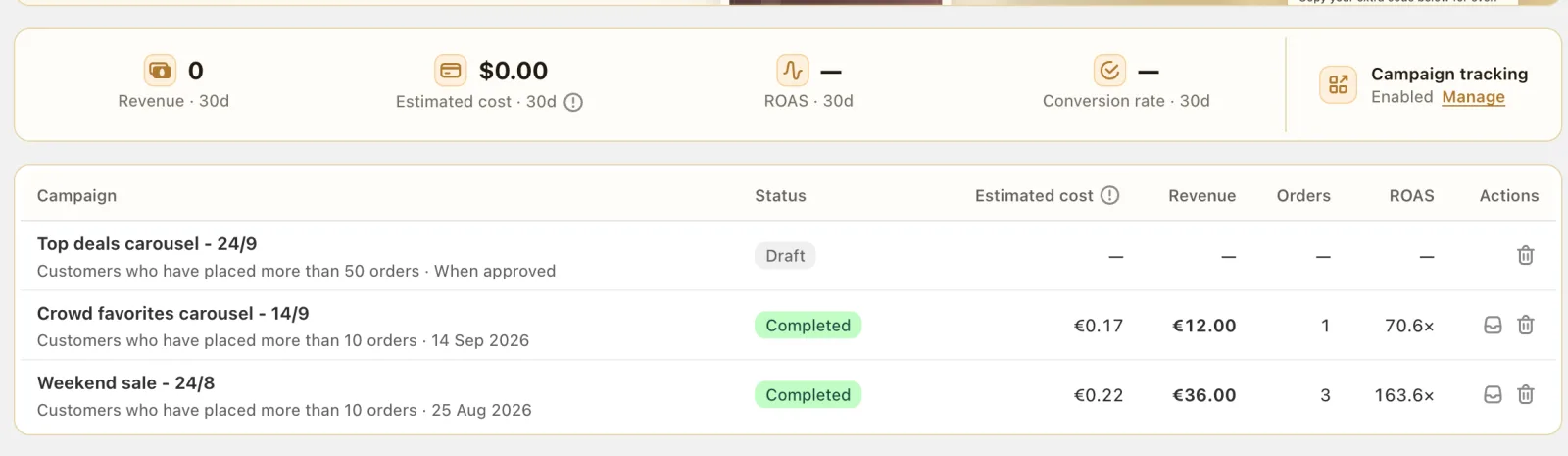
Each campaign page shows visits, orders, revenue and ROAS. By default, Cartsaver credits orders placed within 7 days of a link tap, or within 3 days of delivery without a tap; you can extend both windows to 28 days. Attributed orders are tagged in Shopify, so you can filter them yourself.
Because every stage is its own campaign, you can compare the greeting, the carousels and the cut-off reminder side by side, and reuse the stages that paid for themselves for Eid al-Adha and next Ramadan.
What else should run during Ramadan?
Campaigns bring customers in; the rest of Cartsaver handles what happens after the tap, on the same WhatsApp conversation:
- Abandoned cart recovery on WhatsApp follows up with shoppers who reached checkout and left.
- Post-purchase cross-sells offer one more item, such as a gift, right after the customer confirms, added to the same order.
- Fast Checkout gives cash on delivery buyers a one-page order form with phone verification.
For the November sales, see Black Friday WhatsApp campaigns.
Worked example: a Ramadan sequence for a fashion store in Cairo
A fashion store in Cairo builds four Arabic campaigns in January: the Ramadan template for loyal buyers before the month starts, the Celebration looks carousel with four Eid outfits for recent and lapsed buyers at the start of the last ten days, the Eid template with the last order date a few days later, and Last chance on the cut-off day. Each is scheduled for after iftar, and all four go to Meta for review before Ramadan begins.
During the last ten days, every cash on delivery order goes through WhatsApp order confirmation, and unconfirmed orders are flagged after a few hours so the team can call or release the stock. After Eid, the campaign list shows which stage brought the most revenue for its cost, and the owner reuses it for Eid al-Adha.
Frequently asked questions
Does Cartsaver have Ramadan and Eid WhatsApp message templates?
Yes. The Occasions category has a Ramadan template, an Eid template, a Gift picks carousel and a Celebration looks carousel, in English and Arabic with ready-made banners. You add your own links and promo codes.
When should I start sending Ramadan WhatsApp campaigns?
Send the Ramadan greeting in the days before the month starts, expected around 8 February 2027, and submit the whole sequence to Meta in January. Each message needs Meta’s approval before it can send.
Can I use the Eid template for Eid al-Adha?
Yes. It is a general “Eid Mubarak” message. Edit the text before you submit if you want to name Eid al-Adha or add a last order date.
Which Cartsaver plans can launch a Ramadan campaign?
Scale, Ultra and Elite, with your own WhatsApp sender connected. The Cartsaver commission per delivered campaign message is $0.01 on Scale and $0 on Ultra and Elite; Meta bills its own message charges directly. On Advanced and Unlimited you can build and save drafts but not launch.
Can I send Ramadan campaigns by SMS?
Not yet. Campaigns are sent on WhatsApp; SMS campaigns are coming soon.