
Cartsaver Auto-reply is a WhatsApp order-status bot for Shopify: when a customer sends any message, it finds their orders by phone number and replies with the status, tracking and your contact details, with a menu for invoices and your own FAQs. Most order questions get an accurate answer in seconds, at any hour.
It is for Shopify stores whose support inbox fills up with “where is my order?” messages, and it answers them without someone on your team looking the order up. Cartsaver is a Built for Shopify app by Xtnd that confirms cash on delivery orders on WhatsApp or SMS before you ship, then uses the same WhatsApp conversation for order updates, abandoned cart recovery, one-tap cross-sells, reviews and campaigns, through the official WhatsApp Business API. Auto-reply handles the messages that come back into that conversation.
Why does an order auto-reply matter for COD stores?
Customers who pay on delivery watch the delivery closely, and a late parcel often triggers a WhatsApp message to the store, sometimes several. Each one costs your team time, and an unanswered one can become a refused parcel. Auto-reply answers from the order status and tracking link already in Shopify.
When customers pay on delivery, they watch the delivery closely. In Egypt, the Gulf, Pakistan and India, the natural reaction to a late parcel is a WhatsApp message to the store, often several. Every one of those messages costs your team time, and an unanswered one can turn into a refused parcel at the door.
The answer to most of these messages already sits in Shopify: the order status and the courier’s tracking link. Auto-reply puts that answer in front of the customer directly, so your team only handles the conversations that need a person.
How does WhatsApp auto-reply work?
A customer sends any message to the WhatsApp number your Cartsaver messages come from. Cartsaver matches their phone number to your Shopify orders and replies with up to 10 recent orders. They tap one to see its status, tracking link and your contact details, plus a menu for invoices and FAQs.
Watch the Auto-reply walkthrough (Arabic). Step by step:
- The customer sends any message to the WhatsApp number your Cartsaver messages come from. No keywords or order numbers are needed.
- Cartsaver finds their orders by matching the sender’s phone number and replies with a list of their most recent orders (up to 10) to choose from. If no order matches, the customer gets a reply saying so.
- The customer taps an order and sees its status, the tracking link and your contact details.
- A support menu lets them get an invoice or browse your FAQs.
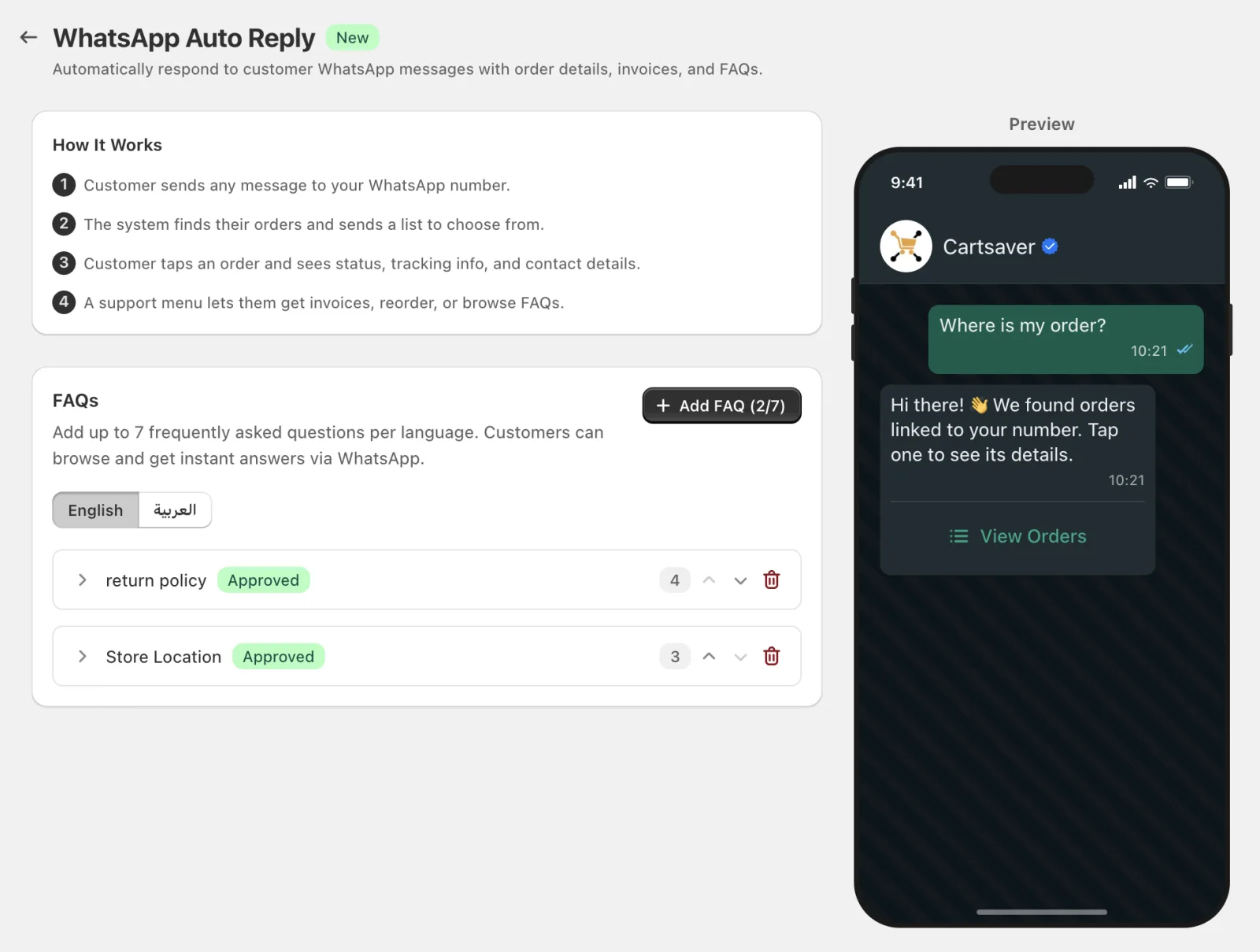
The reply language follows the customer: a message written in Arabic gets an Arabic reply, and anything else gets English.
To keep conversations calm and costs predictable, a customer gets one automatic order list per hour. If they send several messages in a row, only the first one in that hour triggers the list; taps on the buttons and menus in the reply keep working as normal.
What the video covers
- 0:00 Intro and opening Auto-reply: open WhatsApp Auto-reply in Cartsaver, where you can add up to 7 common questions per language.
- 0:20 Adding questions and answers: write each question and its answer in English and Arabic; customers see them in the language of their chat.
- 0:43 What the customer sees on WhatsApp: after picking an order, the customer opens the support menu, taps one of your questions and gets your answer.
What customers can do in the chat
| Action | What the customer gets | Where the data comes from |
| Order status and tracking | The order’s current status and a tracking link | The order and the fulfillment tracking URL saved in Shopify |
| Invoice | A PDF invoice for the order, sent as a file in the WhatsApp chat | The order’s line items, taxes and shipping in Shopify |
| FAQs | Your written answer to a common question | The FAQs you add in Cartsaver |
Tracking depends on your fulfillment data. If the courier’s tracking link is not saved on the Shopify fulfillment, there is nothing to show, so make sure your courier integration or your team adds it when fulfilling.
How does the WhatsApp FAQ bot work?
The FAQ menu answers questions that are not about a specific order, such as delivery times, returns, sizes and payment options. You add up to 7 questions and answers per language, in English and Arabic, and Cartsaver shows how many times customers opened each one.
- Questions are short, 20 characters or fewer, because they appear as menu options in WhatsApp. Write them like buttons: “Delivery time”, “Returns”, “Sizes”.
- Answers can be up to 500 characters. Answer fully, including the next step (a link, a phone number, a time frame).
- Each FAQ shows a review status (Approved or Pending review) and a tap count, so you can see which questions customers actually open.
- Order them by demand. Move the most-tapped questions to the top and replace the ones nobody opens.
A good test for the list: read the last week of customer chats and write an FAQ for every question that came up more than a few times and does not depend on a specific order.
Setup choices and common mistakes
- Auto-reply is included on every Cartsaver plan and is on by default. See the pricing table for plan details.
- Keep Shopify data clean. The reply is only as good as the order data: fulfillment status, tracking links and the customer’s phone number on the order.
- Don’t copy the order status into FAQs. Questions such as “Where is my order?” are already answered by the order lookup. Use the FAQ slots for store policies.
- Write both languages. If many customers write in Arabic, add the Arabic FAQs too, so the menu matches the reply language.
- Keep a human route. Include a support phone or hours in an FAQ answer so customers with an unusual problem know how to reach your team.
Worked example: a Thursday evening in Riyadh
A customer ordered a perfume set with cash on delivery on Monday. On Thursday evening, after your team has gone home, she messages your store on WhatsApp in Arabic: “Where is my order?”. Cartsaver replies in Arabic with her two recent orders. She taps the perfume order and sees that it is fulfilled, with the courier’s tracking link. She also opens the “Delivery time” FAQ, reads that deliveries in Riyadh take two to three working days, and stops worrying. Nobody on your team touched the conversation, and the parcel is far less likely to be refused out of doubt.
How Auto-reply connects to the rest of Cartsaver
Auto-reply works best when customers already know your WhatsApp number from earlier messages. WhatsApp order confirmation starts the conversation when the order is placed, and order notifications keep the customer updated when it is fulfilled or cancelled, which already prevents many questions. Auto-reply then answers the ones that still come in. See all three side by side in the Auto-reply feature breakdown, and your FAQ limits and contact phone in the auto-reply settings in the Cartsaver docs.
Frequently asked questions
Does the customer need to type an order number?
No. Cartsaver matches the customer’s WhatsApp phone number to your Shopify orders and lists their most recent orders. They pick one with a tap.
Does Auto-reply work over SMS?
No. Auto-reply is WhatsApp only, because it relies on interactive lists and buttons that SMS does not support.
Which languages does Auto-reply support?
English and Arabic. Cartsaver replies in Arabic when the customer writes in Arabic, and in English otherwise. You write your FAQs separately for each language.
How many FAQs can I add?
Up to 7 questions and answers per language. Questions can be up to 20 characters and answers up to 500 characters, and Cartsaver shows how many times each FAQ was opened.
Will a customer get the same reply every time they send a message?
No. A customer gets one automatic order list per hour, however many messages they send in that hour. Their taps on order buttons and the support menu are always answered.
Is Auto-reply included in my plan?
Yes. WhatsApp auto-reply with FAQs is included on every Cartsaver plan, including Free.