
Fake Order Protection is the set of Cartsaver safeguards that stop fake cash on delivery orders from reaching your courier: it flags or cancels orders nobody confirms, offers COD only to verified customers, and blocks phone numbers and emails you know are fake. The outcome: you reduce RTO (return to origin) at the source.
It is for Shopify stores where COD is the main payment method and every refused parcel costs shipping both ways, and it leaves a fulfillment queue made of orders a real person has confirmed. Cartsaver is a Built for Shopify app by Xtnd that confirms cash on delivery orders on WhatsApp or SMS before you ship, then uses the same WhatsApp conversation for order updates, abandoned cart recovery, one-tap cross-sells, reviews and campaigns, through the official WhatsApp Business API. Verification asks the customer to confirm; Fake Order Protection decides what happens when they don’t.
Why do fake COD orders happen?
A cash on delivery order costs the buyer nothing to place, so it attracts wrong or made-up numbers, pranks, duplicates and buyers who change their mind before the courier arrives. Each one ties up stock, a courier slot and return shipping. The COD best practices for Egyptian stores guide shows the patterns to watch.
A cash on delivery order costs the buyer nothing to place. That is why COD sells so well in Egypt, the Gulf, Pakistan and India, and also why it attracts orders that never get paid: wrong or made-up numbers, pranks, competitors, duplicate orders, and real customers who changed their mind before the courier arrived. Each one ties up stock, a courier slot and return shipping.
The fix is not a single setting. It is a sequence: verify the customer, act on orders that stay unverified, keep COD for people who proved their number, and stop repeat offenders. Cartsaver covers each step.
The safeguards at a glance
| Safeguard | What it does | Works with |
| Pending Order Action | Marks unconfirmed orders as high risk, or cancels them, after a wait you set (30 minutes to 24 hours) | WhatsApp order confirmation |
| Customer Cancelled Action | When the customer taps Cancel, flags the order for review or cancels it in Shopify | WhatsApp order confirmation |
| Restrict COD to verified customers | Shows cash on delivery at checkout only after the phone number is verified | Pre-checkout verification |
| Online Payment Bypass | Adds a Proceed with Online Payment button so customers who pay online skip the verification code | Pre-checkout verification |
| Blocked contacts | Stops verification codes and confirmations going to phone numbers and emails you blocked | All flows |
| Order page block | Shows the verification status on the Shopify order page, with buttons to change it or chat on WhatsApp | All flows |
How do you set up fake COD order protection?
Turn on WhatsApp order confirmation, then choose what happens to orders nobody confirms and to orders the customer cancels. Add pre-checkout rules if you want COD shown only to verified buyers, and block contacts you know are fake. Test it with your own number before going live.
- Turn on WhatsApp order confirmation as your verification flow.
- Set the Pending Order Action: mark unconfirmed orders as high risk or cancel them, and choose the wait (30 minutes to 24 hours).
- Set the Customer Cancelled Action: flag the order for review or cancel it in Shopify.
- If you use pre-checkout verification instead, turn on Restrict COD to Verified Customers and, under Online Payment Bypass, Enable Bypass Button.
- Add repeat offenders on the Blocked Contacts page (Block Contacts in the Cartsaver menu).
- Place a test COD order with your own number and check the result on the Shopify order page.
Should you auto-cancel or flag unconfirmed COD orders?
Start by flagging. Mark as High Risk keeps unconfirmed orders active for you to review, call or cancel, and Auto Cancel cancels them in Shopify after the wait time you set. Once a week of flagged orders shows they are consistently fake, switch to Auto Cancel.
With WhatsApp order confirmation, the customer places the order and Cartsaver asks them to confirm it with one tap. Some never do. The Pending Order Action decides what happens to those orders:
- Mark as High Risk (the default): the order stays active but is flagged for manual review. You can still call the customer, fulfill it or cancel it.
- Auto Cancel: Shopify cancels the order automatically, which releases the stock.
The wait time starts when the confirmation message is sent and can be set from 30 minutes to 24 hours, with quick presets of 30 minutes, 1, 2, 6, 12 and 24 hours. If you also delay the confirmation message (from immediately up to 48 hours after the order), the countdown starts after that delayed message goes out. If a customer confirms after their order was flagged high risk, Cartsaver marks it confirmed and removes the flag.
Which to choose: start with Mark as High Risk for your first week and look at the flagged orders yourself. If they are consistently fake, switch to Auto Cancel so they never reach your packing table. Pick a wait time that fits your shipping cut-off: long enough for a real customer who was busy to answer, short enough that the decision is made before you hand parcels to the courier.
When the customer taps Cancel
The confirmation message also gives the customer a way to cancel. That is useful: an order cancelled in the chat is a parcel you don’t ship and don’t get back. The Customer Cancelled Action sets what Cartsaver does next:
- Mark as High Risk: the order stays active for you to review, for example to call the customer and save the sale.
- Auto Cancel: the order is cancelled in Shopify straight away.
Stores that like to call back hesitant buyers usually flag; stores with high volume and little time for calls usually cancel.
Can you show cash on delivery only to verified customers?
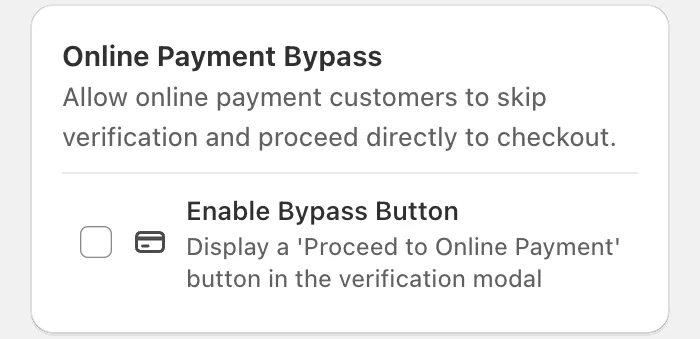
Yes. With pre-checkout verification on, turn on Restrict COD to Verified Customers and cash on delivery appears at Shopify checkout only after the customer verifies their phone number. Customers who pay online can skip the code with the Proceed with Online Payment button, which you add with Online Payment Bypass, so prepaid buyers face no extra step.
With pre-checkout verification, the customer verifies their phone number on the product or cart page before checkout. Turn on Restrict COD to Verified Customers and Cartsaver uses a Shopify Function to change the payment methods at checkout, so cash on delivery appears only after verification. It recognizes the COD method by its name in many languages, including English, Arabic, Hindi and Urdu.
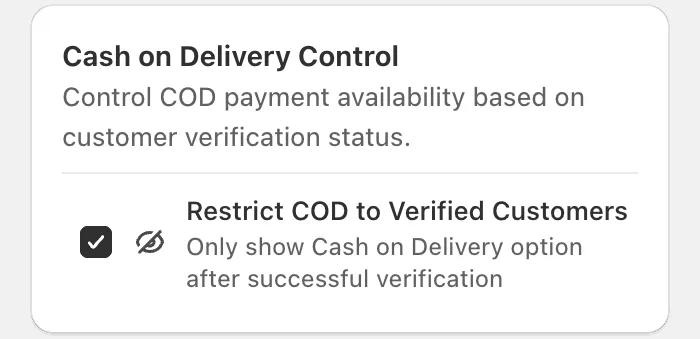
Pair it with Online Payment Bypass: turn on Enable Bypass Button and the verification pop-up shows a Proceed with Online Payment button. Turning it on also turns on Restrict COD to Verified Customers. Customers who want to pay by card skip the code and go straight to checkout, because a paid order carries no COD risk. The result: prepaid buyers face no extra step, and cash on delivery is reserved for numbers that answered.
If your problem is checkout drop-off as well as fake orders, Fast Checkout builds the phone check into a one-page COD form instead. Pre-checkout and WhatsApp order confirmation cannot run together, but Fast Checkout works with either: with WhatsApp order confirmation, its COD orders are confirmed with one tap after they are placed.
Block known fake phone numbers and emails
Some contacts come back again and again. On the Blocked Contacts page (Block Contacts in the Cartsaver menu) you can block a phone number (with its country code) or an email address, and Cartsaver stops sending verification codes and confirmations to it. You can add contacts there by hand or block them in one click from the Logs page, and unblock them, one by one or in bulk, if you made a mistake. See how to block a customer on Shopify.
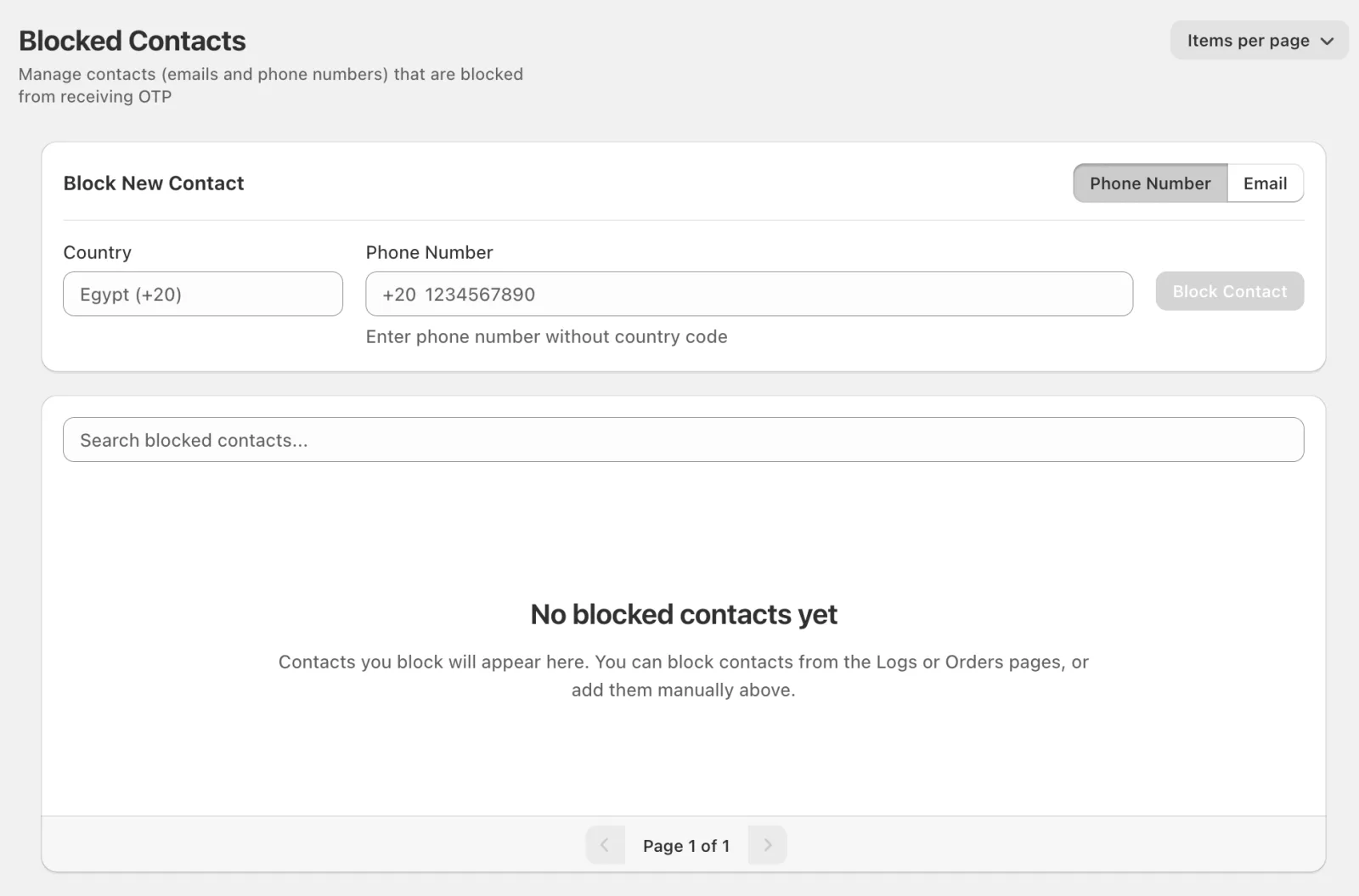
Blocking works on the contact, not the person, so use it for numbers and addresses you have clear evidence about: repeated refusals, obvious fakes, abuse. Don’t block a number after a single missed delivery.
The verification block on the Shopify order page
Your team works in Shopify, not in an app dashboard, so Cartsaver adds a block to the Shopify order page for cash on delivery and other manual payment orders. It shows whether the customer’s contact is verified, and gives three actions: Mark as verified (for example after confirming by phone), Mark as not verified, and Chat with customer, which opens WhatsApp with a ready-made follow-up message about that order.
Marking an order as verified updates the order itself, not just the label: Cartsaver adds its verification tag in Shopify, removes the tags left by the pending-order timeout, lowers the order’s risk level and updates the order’s status in Cartsaver. A high-risk order your team confirmed by phone is then ready to fulfill like any other verified order.
Worked example: a cosmetics store in Alexandria
A store shipping with a local courier hands over parcels at 4 pm every day. The owner uses WhatsApp order confirmation with the message sent immediately, Pending Order Action on Mark as High Risk, and a 6-hour wait. For a week, she checks the flagged orders each afternoon and calls a few. Almost none answer, so she switches to Auto Cancel. When a customer taps Cancel in the chat, the order is flagged so her team can call and offer a different shade. Two numbers that placed several fake orders go on the block list from the Logs page. By the next week, the orders left for the 4 pm pickup are the ones customers confirmed.
Common mistakes
- Turning on Auto Cancel on day one, before you have seen what your unconfirmed orders look like.
- A wait time longer than your shipping cut-off, so unconfirmed orders get packed before Cartsaver acts.
- Asking prepaid customers for a code instead of offering the Proceed with Online Payment button.
- Blocking too quickly, which can lock out a real customer who had one bad week.
Learn more
All of these safeguards are listed together in the Fake Order Protection feature breakdown. For the Pending Order Action screen, wait-time presets and message delay, see the WhatsApp order confirmation docs. Message allowances for each plan are in the pricing table.
Frequently asked questions
How do I stop fake COD orders on Shopify?
Verify every cash on delivery customer on WhatsApp or SMS, then act on orders that stay unverified. With Cartsaver, unconfirmed orders are flagged high risk or cancelled automatically after a wait you choose, COD can be shown only to verified customers, and known fake contacts can be blocked.
Can Cartsaver cancel unverified orders automatically?
Yes. Set the Pending Order Action to Auto Cancel and choose a wait time from 30 minutes to 24 hours after the confirmation message. The default is Mark as High Risk, which flags the order for review instead.
Can I hide cash on delivery until the customer is verified?
Yes, with pre-checkout verification. Turn on Restrict COD to Verified Customers and a Shopify Function shows cash on delivery at checkout only after the customer’s phone number is verified.
What happens when a customer taps Cancel in the confirmation message?
You decide: Cartsaver either flags the order as high risk for you to review, or cancels it in Shopify straight away.
Can I block a phone number or email from ordering again?
You can block phone numbers and email addresses on the Blocked Contacts page, or from the Logs page. Cartsaver then stops sending verification codes and confirmations to that contact, so it cannot be verified.
Should I ask for a deposit or partial COD payment to stop fake orders?
Cartsaver does not collect deposits or partial payments on cash on delivery orders. It stops fake orders by verifying the customer instead, with a one-tap WhatsApp confirmation or a code on WhatsApp or SMS, and then flags or cancels orders nobody confirms. Customers who choose online payment pay in full in Shopify checkout.
Does Cartsaver use a CAPTCHA to stop bots placing COD orders?
No. Cartsaver has no CAPTCHA. Instead, a COD order only counts once a real phone number confirms it. Codes are 4 digits and expire after 10 minutes, a new code can be requested only after 60 seconds, and Fast Checkout limits how many orders one visitor can place per minute. Blocked contacts receive no codes at all.
What is RTO, and how do I reduce it on Shopify COD orders?
RTO (return to origin) is a parcel the courier brings back to you because the customer refused it or could not be reached. You pay shipping both ways and lose the sale. To reduce it, confirm every COD order on WhatsApp before you ship, act on unconfirmed orders, and keep customers updated until delivery.