

Black Friday WhatsApp marketing for Shopify means sending your sale announcements, early-access codes and last-call reminders to Shopify customer segments on WhatsApp, then measuring the orders they bring in. In Cartsaver you start from six ready-made Black Friday templates, schedule each message and see its estimated cost before launch.
This guide is for Shopify merchants planning Black Friday and Cyber Monday (27 to 30 November 2026) or White Friday in the Gulf, where many stores run sales through much of November. Cartsaver is a Built for Shopify app by Xtnd that confirms cash on delivery orders on WhatsApp or SMS before you ship, then uses the same WhatsApp conversation for order updates, abandoned cart recovery, one-tap cross-sells, reviews and campaigns, through the official WhatsApp Business API. For the full feature, see WhatsApp marketing for Shopify.
What Black Friday WhatsApp message templates does Cartsaver include?
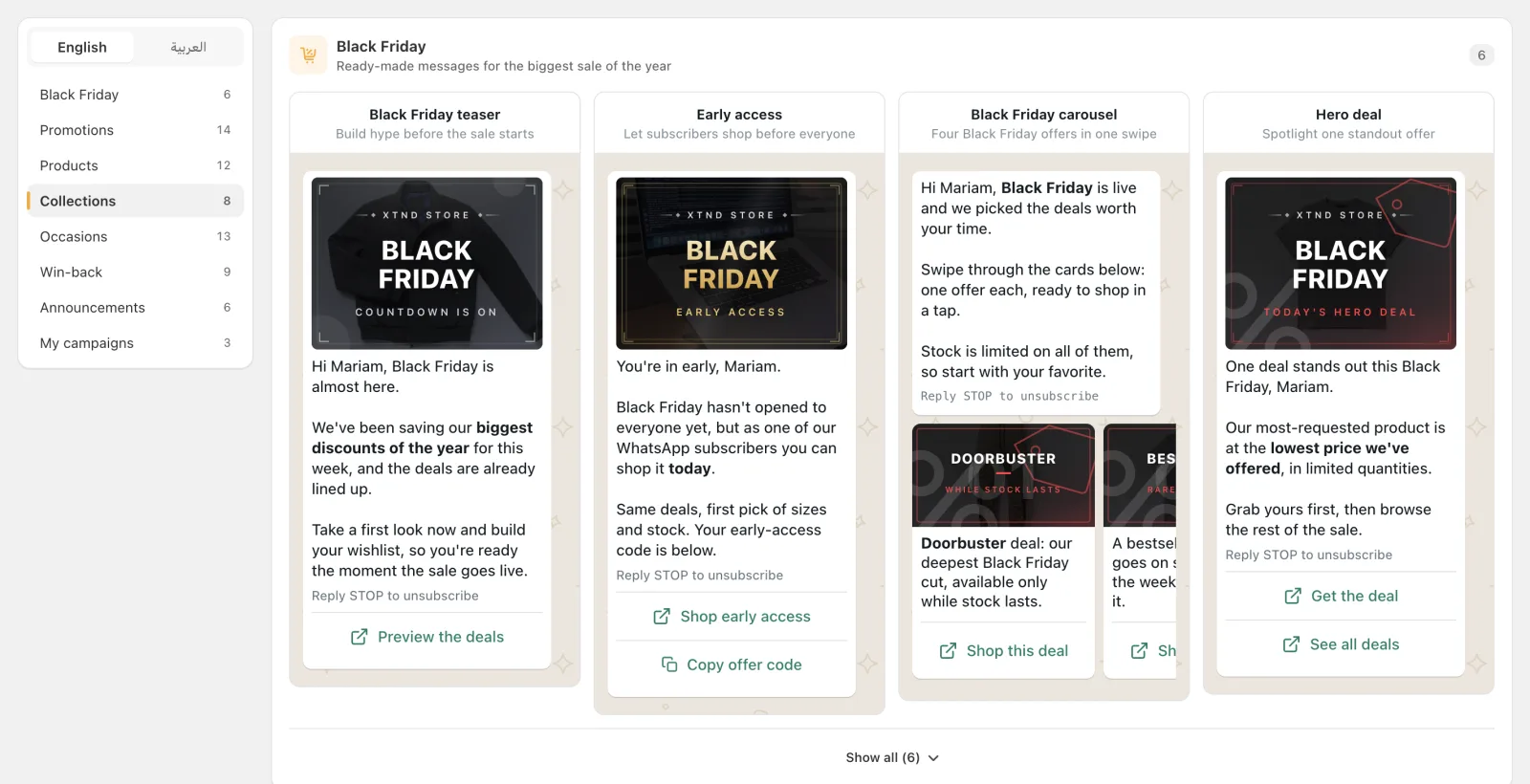
The template library has a Black Friday category with six templates: Black Friday teaser, Early access, Black Friday carousel, Hero deal, Final hours and Bonus day. Each one comes in English and Arabic with a ready-made banner, and covers one moment of the sale, from the week before to the day after.
| Template | What it says | Format and buttons |
| Black Friday teaser | The sale is almost here; take a first look and build a wishlist | Single message, one store link |
| Early access | WhatsApp subscribers can shop the sale before everyone else | Single message, store link and copy-code button |
| Black Friday carousel | Four offers in one swipe: a doorbuster, a bestseller, a bundle and a gift idea | Carousel of four cards, a “Shop this deal” button on each |
| Hero deal | One standout product at its lowest price, in limited quantities | Single message, a link to the deal and a link to all deals |
| Final hours | The sale ends at midnight and the code still works until then | Single message, store link and copy-code button |
| Bonus day | The deals stay open one more day, with a fresh code | Single message, store link and copy-code button |
The Occasions category also has a general Black Friday template (“Your biggest sale of the year”) if you only want to send one message. Every template inserts the customer’s first name. Store links and promo codes are left empty for you to fill in, and Cartsaver won’t submit the campaign until they are. In the Arabic version, the banners read “الجمعة البيضاء” (White Friday).
How do I plan a WhatsApp Black Friday campaign?
Plan it as a short sequence, not one blast: a teaser a few days before, early access the day before, the carousel or hero deal on the day, a final-hours reminder before the sale ends, and a bonus day if you extend. Send each message to the segment most likely to act on it.
A sequence for Black Friday 2026 could look like this. Gulf stores running White Friday over several weeks can stretch the same steps across November.
- Monday 23 or Tuesday 24 November: Black Friday teaser to loyal and recent buyers, so they are ready when the sale opens.
- Thursday 26 November: Early access with a code, to your best customers.
- Friday 27 November: Black Friday carousel or Hero deal to a wider audience, scheduled for the morning in your timezone.
- Last day of your sale: Final hours, to customers who received earlier messages and have not ordered.
- Saturday 28 November or Cyber Monday, 30 November: Bonus day, if you extend the deals.
You can set each campaign to start as soon as Meta approves it, or schedule a date and a half-hour time slot in your local timezone. Prepare and submit the whole sequence early, because each message has to pass Meta’s review before it can send, and after you submit, the message text is locked.
Who should get each Black Friday message?
Use a different audience for each step. Cartsaver offers four quick audiences (recent buyers, loyal buyers, one-time buyers and lapsed buyers) next to every customer segment you built in Shopify, and shows how many customers in each audience have a phone number, so you know the real reach.
- Loyal and recent buyers suit the teaser and early access: they already trust you and are the most likely to buy first.
- Lapsed buyers suit the hero deal or the carousel: one strong reason to come back.
- A Shopify segment of a category’s buyers suits a carousel built from that category.
Relevant audiences also protect your sender’s quality rating, which Cartsaver shows as High, Medium or Low. While it is Medium or Low, you cannot submit a campaign, and campaigns that are already sending stop. In a week when you send several messages, sending fewer, better-targeted messages is the safer plan.
What do I need to set up before Black Friday?
Four things: a Scale, Ultra or Elite plan with your own WhatsApp sender connected, the Campaign Tracking app embed turned on in your theme, Meta approval for each campaign message, and customers who have agreed to hear from you on WhatsApp. Start now; sender setup and Meta review both take time.
- Plan and sender. Launching campaigns needs the Scale, Ultra or Elite plan and your own WhatsApp Business sender, because marketing messages go out under your brand and number. On Advanced and Unlimited you can build the whole Black Friday sequence and save it as drafts, but you can’t launch it. If your plan supports campaigns and no sender is connected, Cartsaver asks you to contact support to set one up; the sender ID and own WhatsApp number guide explains the options.
- Campaign Tracking. Turn on the Campaign Tracking app embed in your Shopify theme, so Cartsaver can see storefront visits and credit orders to each campaign.
- Meta approval. Every campaign message is submitted to Meta as a marketing template and sends only after approval. If Meta rejects it, Cartsaver shows the reason so you can edit and resubmit. Meta’s rules for templates are in its template documentation.
- Opt-in. Meta requires businesses to get a customer’s permission before sending them WhatsApp messages; see Meta’s guide to getting opt-in for WhatsApp and the WhatsApp Business Policy. Customers who reply STOP no longer receive campaigns from your store.
- Promo codes. Create your Black Friday discount codes in Shopify first. A copy-code button accepts Latin letters and numbers only, with no spaces or symbols, up to 15 characters.
Meta also limits how many marketing messages a sender can deliver per day (Meta’s messaging limits). If your sender reaches that limit, Cartsaver pauses the campaign and resumes it the next day, so for a large list, start the main send early in the day.
How much does a Black Friday WhatsApp campaign cost?
A campaign has two costs. Meta charges a marketing rate per message that depends on the customer’s country, which you pay to Meta directly. Cartsaver adds a Cartsaver commission per delivered campaign message: $0.01 on Scale and $0 on Ultra and Elite, billed through Shopify. You see an estimated cost before launch.
Cartsaver does not mark up Meta’s message charges. The estimated cost receipt in the editor lists both lines, based on the customers in your audience who have a phone number, so check it for each message in your sequence before you submit. Campaigns are sent on WhatsApp today; SMS campaigns are coming soon.
How do I see what each Black Friday message earned?
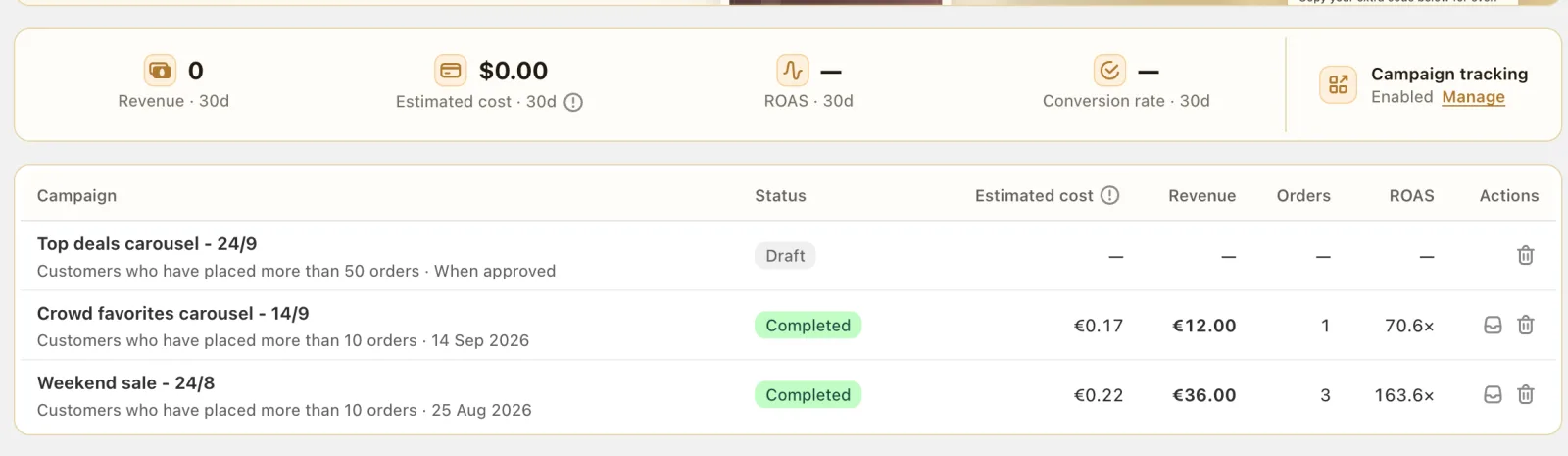
Each campaign page shows visits, orders, revenue and ROAS. By default, Cartsaver credits orders placed within 7 days of a link tap, or within 3 days of delivery without a tap; you can extend both windows to 28 days. Attributed orders are tagged in Shopify, so you can filter them yourself.
Because every message in your sequence is its own campaign, you can compare the teaser, the early access and the final-hours reminder side by side, and keep the steps that paid for themselves for next year.
What else should run during the Black Friday rush?
Campaigns bring customers in; the rest of Cartsaver handles what happens after the tap. During a sale, more carts are left behind, more cash on delivery orders arrive at once, and some of them are fake. These features work on the same WhatsApp conversation:
- Abandoned cart recovery on WhatsApp follows up with shoppers who reached checkout and left.
- Post-purchase cross-sells offer one more product right after the customer confirms, added to the same order.
- Fast Checkout gives cash on delivery buyers a one-page order form with phone verification.
- One-tap WhatsApp order confirmation and fake COD order protection keep unconfirmed and fake orders out of your shipping queue when volume peaks.
The next big season is the holy month: see Ramadan and Eid WhatsApp campaigns.
Worked example: a White Friday sequence for a store in Riyadh
A home goods store in Riyadh runs White Friday through the last week of November. The owner builds three Arabic campaigns from the Black Friday category: Early access with a code for loyal buyers, the carousel with four products for recent and lapsed buyers, and Final hours with the same code for the last evening. They schedule each one, check the reachable count and estimated cost for each audience, and submit all three for Meta review well before the sale starts.
During the sale, orders from the campaigns go through WhatsApp order confirmation before shipping. Afterwards, the campaign list shows which of the three messages brought the most revenue for its cost.
Frequently asked questions
Does Cartsaver have Black Friday WhatsApp message templates?
Yes. The template library has a Black Friday category with six templates in English and Arabic: Black Friday teaser, Early access, Black Friday carousel, Hero deal, Final hours and Bonus day. Each comes with a ready-made banner, and you add your own links and promo codes.
Which Cartsaver plans can launch a Black Friday campaign?
Scale, Ultra and Elite, with your own WhatsApp sender connected. The Cartsaver commission per delivered campaign message is $0.01 on Scale and $0 on Ultra and Elite; Meta bills its own message charges directly. On Advanced and Unlimited you can build and save drafts but not launch.
Can I schedule Black Friday WhatsApp messages in advance?
Yes. Set a date and time in your local timezone, or start as soon as Meta approves the message. Submit early: each message needs Meta’s approval before it can send, and its text is locked once submitted.
Can I use the same templates for White Friday or Cyber Monday?
Yes. The Arabic versions already say White Friday (الجمعة البيضاء), and you can edit any template’s text before you submit it, for example to mention Cyber Monday in the Bonus day message.
Can I send Black Friday campaigns by SMS?
Not yet. Campaigns are sent on WhatsApp; SMS campaigns are coming soon.