
To connect your WhatsApp Business number to Shopify with Cartsaver, open the Connect your WhatsApp card on the Cartsaver dashboard, complete Meta's official sign-up and verify your number by text message or phone call. On the Scale, Ultra and Elite plans, order confirmations, updates and campaigns then come from your number, and Meta bills you directly for its messages.
Free planSet up in about 1 minuteInstall on Shopify(opens in a new tab)
This guide covers why you would use your own number, what to prepare, the steps, what happens after you connect and what it costs. Cartsaver is a Built for Shopify app by Xtnd that confirms cash on delivery orders on WhatsApp or SMS before you ship, then uses the same WhatsApp conversation for order updates, abandoned cart recovery, one-tap cross-sells, reviews and campaigns, through the official WhatsApp Business API.
What changes when you connect your own WhatsApp Business number?
Customers see your business on WhatsApp instead of Cartsaver's default sender, and every message lands in one conversation with your number. Every plan can send from day one through Cartsaver's default sender. Connecting your own number on Scale, Ultra or Elite changes who the customer sees, unlocks WhatsApp campaigns and moves message billing to your own Meta account.
| Cartsaver's default sender (all plans) | Your own WhatsApp Business number | |
|---|---|---|
| Who customers see | Cartsaver's WhatsApp business number | Your number and the display name you set in Meta's sign-up |
| WhatsApp campaigns | Not available | Available on Scale, Ultra and Elite |
| Cartsaver message credits | Used from your plan's monthly credits | Not used |
| Who bills the messages | Included in your Cartsaver plan | Meta, directly, with no Cartsaver markup |
Why send from your own number?
Trust and continuity. Cash on delivery customers are wary of unknown numbers, and a confirmation from the number they already chat with is easier to trust and to find again when the courier calls. The order confirmation, shipping update, review request and any campaign all arrive in the same conversation, so the relationship stays with your brand.
It is not required to start: many stores confirm orders on the default sender for months. Connect your number when you want to run WhatsApp marketing for Shopify, when customers keep asking who is writing, or when you want message costs on your own Meta account.
Which Cartsaver plan do you need to use your own WhatsApp number?
Scale ($79.99 a month), Ultra ($159.99 a month) or Elite ($349.99 a month). On lower plans the Connect your WhatsApp card is locked with an Upgrade your plan button, and messages go out from Cartsaver's default sender. Prices for every plan are in the pricing table.
What do you need before you connect?
Three things: the right plan, Super Admin access to your business portfolio in Meta, and a phone number that can receive Meta's verification code by text message or phone call. The card in Cartsaver lists Super Admin access as the one requirement under "Before you connect, make sure you have".
- Plan: Scale, Ultra or Elite.
- Super Admin access to your Meta business portfolio (formerly Business Manager). If someone else owns it, ask them to give you Super Admin access or to run the sign-up with you.
- A phone number that can receive a text message or a call during sign-up. A number you already use in the WhatsApp Business app can be connected, and it keeps working in the app. For a number on the personal WhatsApp app, check Meta's current rules before you start.
- A display name for your business, the name customers see on WhatsApp. You set it in Meta's sign-up and Meta reviews it.
How do you connect your WhatsApp Business number to Shopify?
From the Cartsaver dashboard, click Connect your WhatsApp, follow Meta's sign-up window, add and verify your number, and return to Cartsaver. The card then shows Pending setup while Cartsaver's team finishes the setup on its side. The Meta part takes about a minute when you have Super Admin access ready.
- Open Cartsaver from Shopify admin > Apps. The Connect your WhatsApp card is on the Dashboard.
- Click Connect your WhatsApp. Meta's official sign-up opens in a pop-up window. It names Xtnd, the company behind Cartsaver, as the partner you are connecting to.
- Sign in with Facebook and choose your business. Pick your business portfolio and WhatsApp Business account, or create them, and set the display name customers will see.
- Add your phone number and choose how to verify it: Text message or Phone call. Enter the code Meta sends and finish the sign-up.
- Back in Cartsaver, you see "WhatsApp connected successfully" and the card shows WhatsApp connected with the status Pending setup. Cartsaver's team completes the setup, and the status changes to Active.

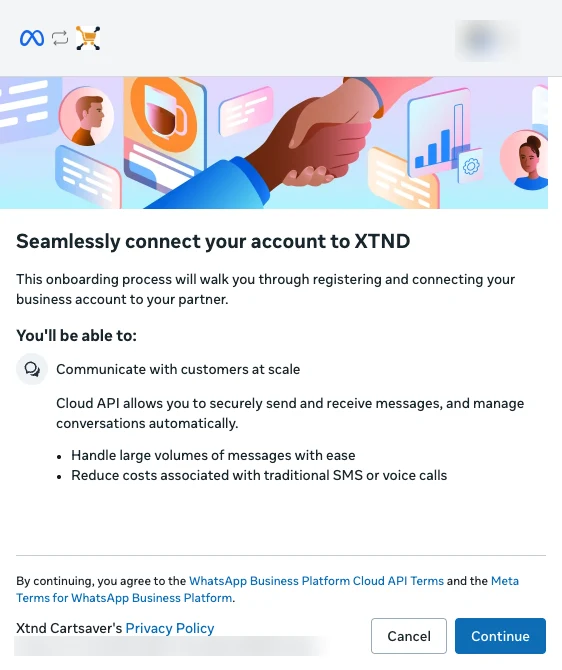
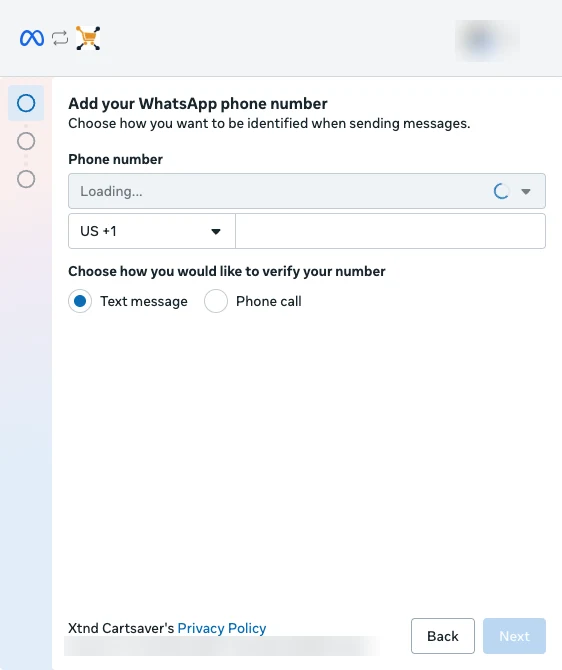
Every click and screen, with fixes for common errors, is in the Cartsaver docs: connect your own WhatsApp number. If the window closes early or you see "Failed to connect WhatsApp. Please try again.", try again or message Cartsaver support.
What happens after you connect?
Your part is done once the card shows Pending setup. Cartsaver's team then finishes the setup on its side, including your message templates, and your number starts sending automatically when it is ready. This usually takes about an hour, and anywhere from a few minutes to 3 hours depending on Meta's approval. Until the status is Active, messages keep going out from Cartsaver's default sender, so no customer misses a confirmation.
Once your number is Active, order confirmations, verification codes, order notifications, abandoned cart reminders, cross-sells, follow-ups and review requests all come from your number, and you can launch campaigns. The card shows your Meta phone number ID (Number ID), not the phone number itself. A new number can start out Limited by Meta's restrictions on new senders; keep it active with real order messages and it is usually fully ready in about a week.
How much does it cost to send from your own WhatsApp number?
Messages sent from your own WhatsApp number don't use your Cartsaver message credits; Meta bills you per message directly, with no Cartsaver markup. You pay Meta's published rates on your Meta account, with a payment method set up in Meta. WhatsApp campaigns also carry a Cartsaver commission per delivered campaign message: $0.01 on Scale and $0 on Ultra and Elite.
Meta's rates depend on the message type and the customer's country, and Meta changes them from time to time. The plan comparison in the Cartsaver docs lists the sender options per plan. If Meta reports a problem with your payment method, the card shows "Payment issue detected" with an Update payment method button that opens Meta's billing page.
What if Meta pauses your number for an unpaid balance?
If Meta rejects your number's messages because of an unpaid Meta balance, Cartsaver pauses your sender. Order confirmations and notifications go out from Cartsaver's default sender until you settle the balance in Meta and click Reactivate, and campaigns stop until then. The card shows a notice that messages are temporarily sent from the default sender.
This backup covers an unpaid Meta balance only. If Meta limits or restricts your number for quality or policy reasons, nothing switches automatically, and campaigns can't launch while Meta rates your number's quality as low.
How do you protect your number's quality?
Cartsaver sends through the official WhatsApp Business API, the route Meta allows for automated business messages, unlike WhatsApp Web scripts. That does not make a number immune: Meta can still limit any number that customers block or report. Keep messages expected and useful: WhatsApp order confirmation and updates for real orders, and campaigns only to customers who want them.
Frequently asked questions
Can I use the WhatsApp Business number I already use on my phone?
Yes. A number you use in the WhatsApp Business app can be connected through Meta's sign-up, and it keeps working in the app. For a number on the personal WhatsApp app, check Meta's current rules first.
Does Cartsaver charge for messages sent from my own number?
No. Messages sent from your own WhatsApp number don't use your Cartsaver message credits; Meta bills you per message directly, with no Cartsaver markup. Campaigns add a Cartsaver commission per delivered campaign message: $0.01 on Scale and $0 on Ultra and Elite.
How long until messages come from my number?
After Meta's sign-up, your number shows Pending setup while Cartsaver's team finishes the setup, then it turns Active and starts sending automatically. Messages go out from Cartsaver's default sender in the meantime. If it stays pending, message Cartsaver support.
What name will customers see on WhatsApp?
The display name you set in Meta's sign-up window, which Meta reviews. Use your store name as customers know it.
Why do I need Super Admin access?
Meta's sign-up connects your business portfolio and WhatsApp Business account to Cartsaver, and Cartsaver asks for Super Admin access to that portfolio before you connect.
Can I change or disconnect my number?
Not from the app. To switch to another number or go back to Cartsaver's default sender, message Cartsaver support.
Why do messages still come from Cartsaver's default sender?
Usually because your number is still Pending setup, or it was paused for an unpaid Meta balance. The Cartsaver docs cover each case. To brand your SMS as well, see the branded SMS sender ID guide, and if you are new, start with how to install Cartsaver on Shopify.