
Shipping Hub is Cartsaver’s Shopify Bosta integration for cash on delivery stores in Egypt: book Bosta deliveries from your Shopify orders without retyping them, with the right cash to collect, and print airway bills and a pickup manifest in a few clicks. Before you book, you see whether Cartsaver verified the order and how the customer’s past deliveries went. Bosta, the Egyptian courier, picks up and delivers; Cartsaver is not a courier.
Free planSet up in about 1 minuteInstall on Shopify(opens in a new tab)
Shipping Hub is in Beta, works with Bosta in Egypt, and is included on every Cartsaver plan, including Free. Bosta’s delivery fees stay as agreed in your own Bosta contract.
Cartsaver is a Built for Shopify app by Xtnd that confirms cash on delivery orders on WhatsApp or SMS before you ship, then uses the same WhatsApp conversation for order updates, abandoned cart recovery, one-tap cross-sells, reviews and campaigns, through the official WhatsApp Business API. Shipping Hub covers the next step: booking the parcel with your courier, with the order’s history in front of you.
Why does a Shopify Bosta integration matter for COD stores in Egypt?
For a cash on delivery store, every parcel booked for a fake or careless order wastes shipping costs. A Shopify Bosta integration inside your confirmation app lets you see whether Cartsaver verified the order, and how the customer’s past deliveries went, before you book, then send the order to Bosta without retyping it.
Bosta is a Cairo-based delivery company for online sellers; by its own figures it handled 37 million parcels in 2025 (company figure reported by Launch Base Africa). Shipping Hub sends the receiver’s details, the items and up to 10 product photos from the Shopify order itself.
Shipping Hub or Bosta’s own Shopify app?
Bosta publishes its own Shopify apps, Bosta Shipping and Bosta Fulfillment, whose listings (checked 14 November 2026) describe syncing Shopify orders to Bosta automatically. If you want every order sent to Bosta automatically, those apps do that. Shipping Hub instead puts the check and the booking on one screen:
| Cartsaver Shipping Hub | Bosta’s Shopify apps | By hand | |
| Getting orders to Bosta | Booked one by one from a panel | Synced automatically (per listing) | Retyped in Bosta’s dashboard |
| Pickup scheduling | No, arranged with Bosta | Listed by Bosta Shipping | In Bosta’s dashboard |
| WhatsApp COD confirmation | In the same app | Not listed | Separate tool |
| Customer delivery history | Bosta and store gauges | Not listed | No |
| Edit cash to collect or address before booking | Yes | Not listed | By hand |
| Pickup manifest with cash totals | Yes, English and Arabic | Not listed | By hand |
| Tracking on the Shopify order | Yes | Yes (per listing) | Added by hand |
How do you connect Bosta to Shopify in Cartsaver?
Open Shipping Hub in Cartsaver, go to Settings, click Connect and paste a Full Access API key from your Bosta dashboard. Cartsaver then loads the pickup locations on your Bosta account. Choose the one Bosta collects your parcels from, set your usual package size, and you can start booking.
You need a Bosta account, a Full Access API key (cancelling a shipment needs it, so Cartsaver refuses a narrower key) and a pickup location on that account. Bosta explains how to get your Bosta API key. The key is stored encrypted, and you can disconnect at any time.
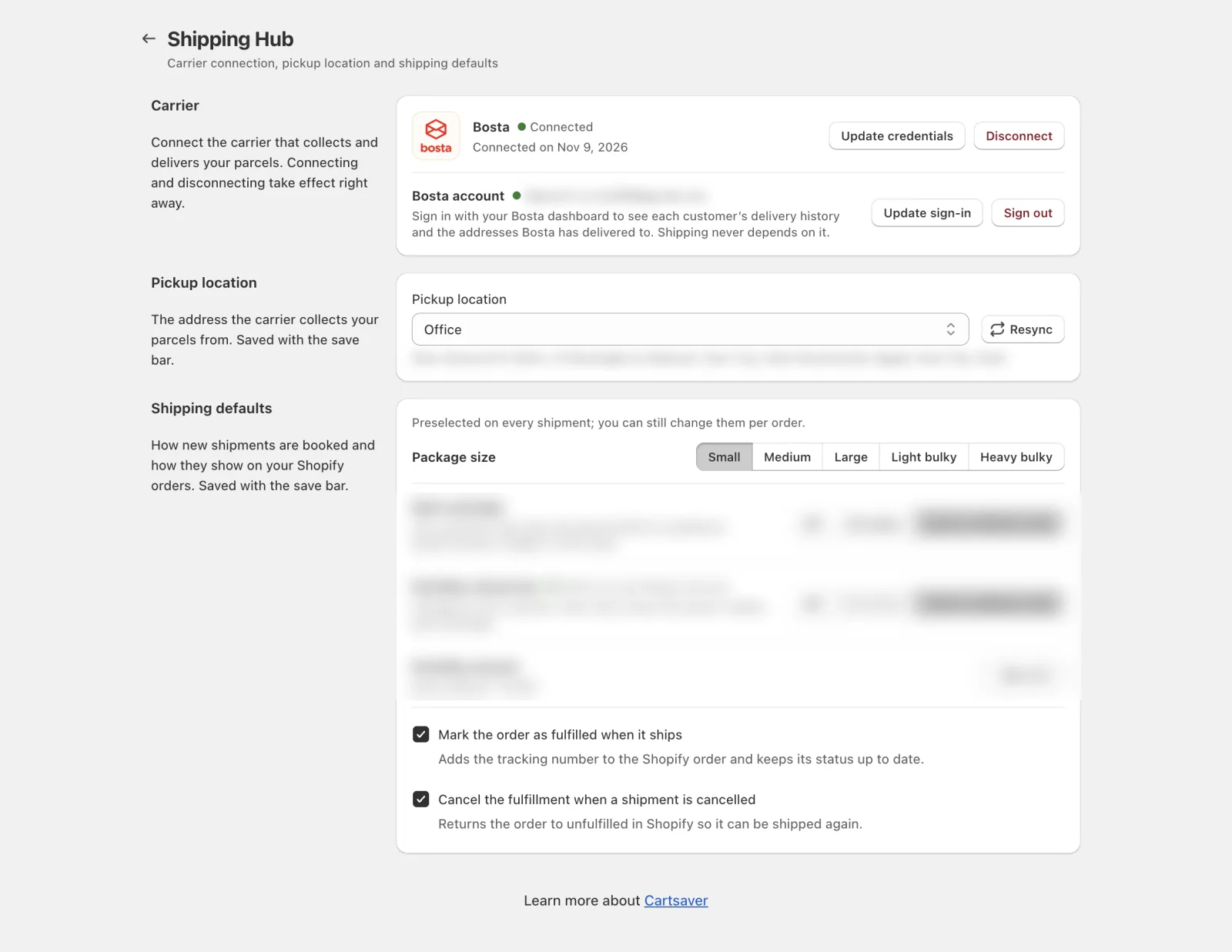
For every option, see the Shipping Hub settings in the Cartsaver docs.
How do you book Bosta deliveries order after order?
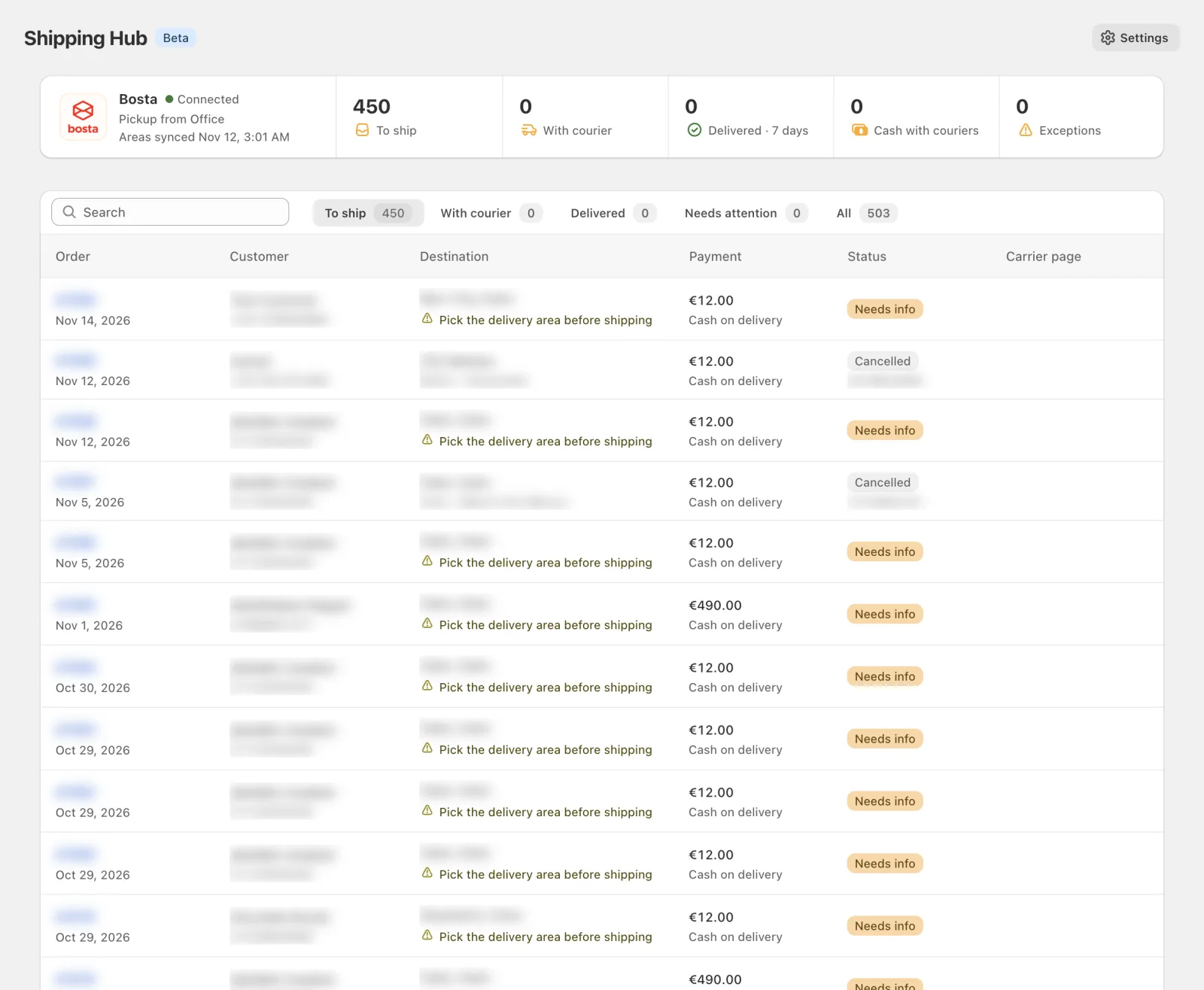
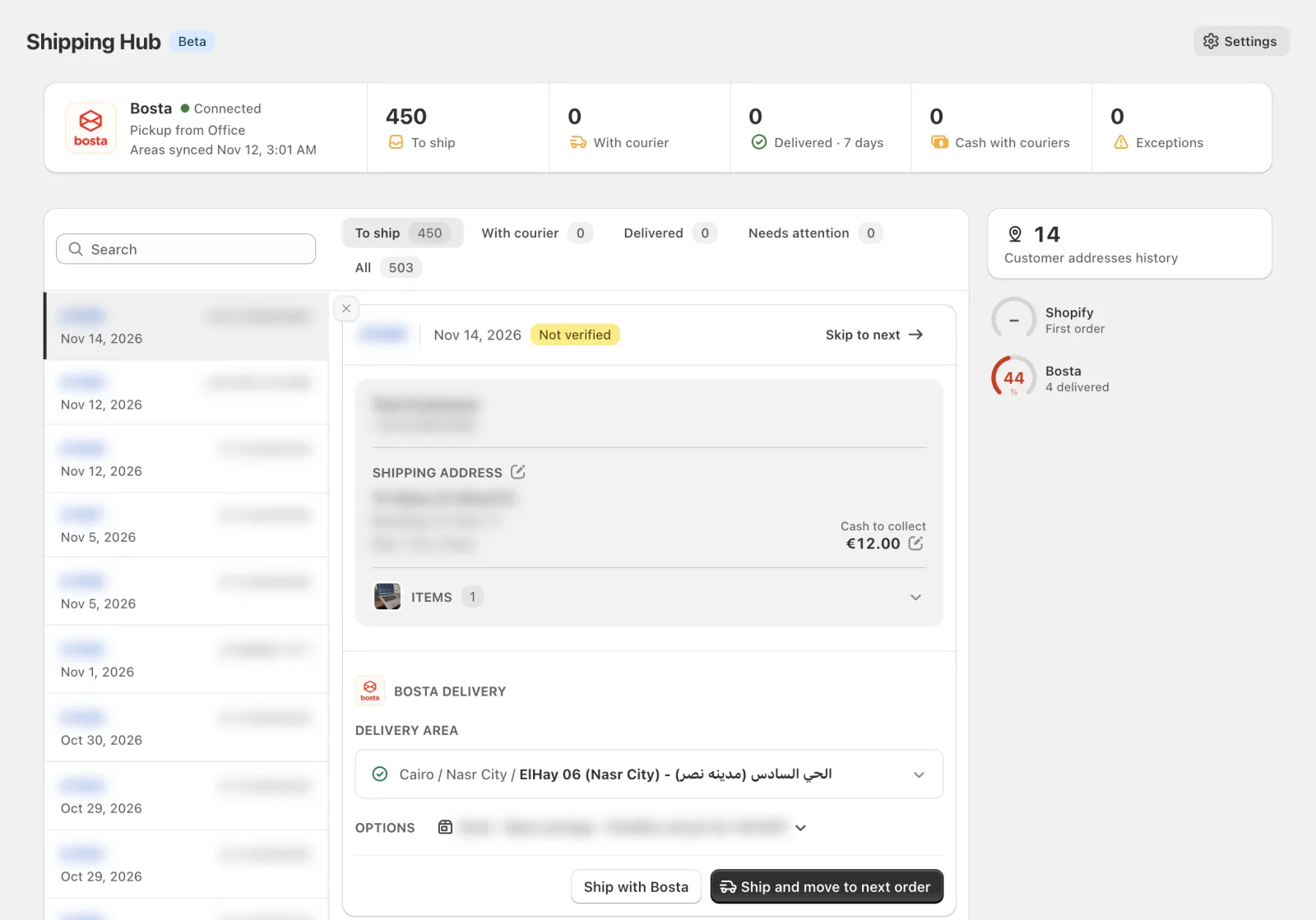
The To ship tab lists your unfulfilled Shopify orders. Click one and it opens in a panel beside the list, with its delivery area, cash to collect and package size ready. Click Ship and move to next order: the booking goes to Bosta in the background and the next order opens, so you can work through the queue without retyping anything.
In the panel, four things are prepared for you:
- Delivery area. Bosta books at district level. Cartsaver matches the governorate from the Shopify province and preselects the district when the order’s city matches a Bosta area name exactly. Otherwise, search the list, which shows each area in Arabic and English.
- Cash to collect. The amount still unpaid on the Shopify order, so prepaid orders collect nothing. Agreed a different amount with the customer? Click Edit cash to collect before booking; the Shopify order itself is not changed.
- Package size. From Small to Heavy bulky. Your default is preselected, and your choice carries over to the next order.
- Open package and FlexShip refusal fee. Let the customer open the parcel before accepting it, on all orders or cash on delivery orders only. If FlexShip is active on your Bosta account, the customer pays the refusal fee when they turn the parcel down at the door, but only on orders where the fee is on (your rule: all orders or cash on delivery only). When it is off, Cartsaver tells Bosta not to charge it.
If the address is wrong, click Edit address: the fix is saved on the Shopify order. The items’ value is sent to Bosta, which uses it for insurance under your Bosta contract. If Bosta does not confirm a booking, Cartsaver never retries it blindly; Check with carrier looks the order up in Bosta first, so the same order is not booked, or its cash collected, twice.
Can I see a customer’s delivery history before shipping a COD order?
Yes. Cartsaver’s customer delivery score shows how a customer’s past deliveries went before you book theirs. One gauge shows their delivery success rate across Bosta, with delivered and returned counts; a second shows how their orders in your store went. The Bosta gauge needs an optional sign-in. The score informs you and never blocks shipping.
- Bosta gauge: the customer’s delivery success rate across every merchant Bosta delivers for, matched by phone number, with how many parcels they received. Hover for delivered and returned counts. If Bosta has reported unpaid returns for that number, the gauge says so.
- Store gauge: the share of the customer’s recent orders in your store that were neither cancelled nor returned, with their order count. A new customer shows “First order”.
Green means 85% or more, amber 60% to 84%, red below 60%. A red gauge on an unverified order is worth a phone call before you book. If Bosta’s history is unavailable, the gauge says so and booking works as usual.
To turn on the Bosta gauge, sign in with your Bosta dashboard account under Bosta account in Shipping Hub settings. Without the sign-in, booking works as usual, the Bosta gauge shows “Sign in to see”, and the store gauge still works.
How do airway bills and the pickup manifest work?
Print one airway bill with Print label, the parcels you select on the With courier tab with Print labels, or every booking in your session with Print all labels. Print manifest prints a pickup sheet in English and Arabic for the selected parcels, with the cash to collect, totals and signature lines for the handover to Bosta’s driver.
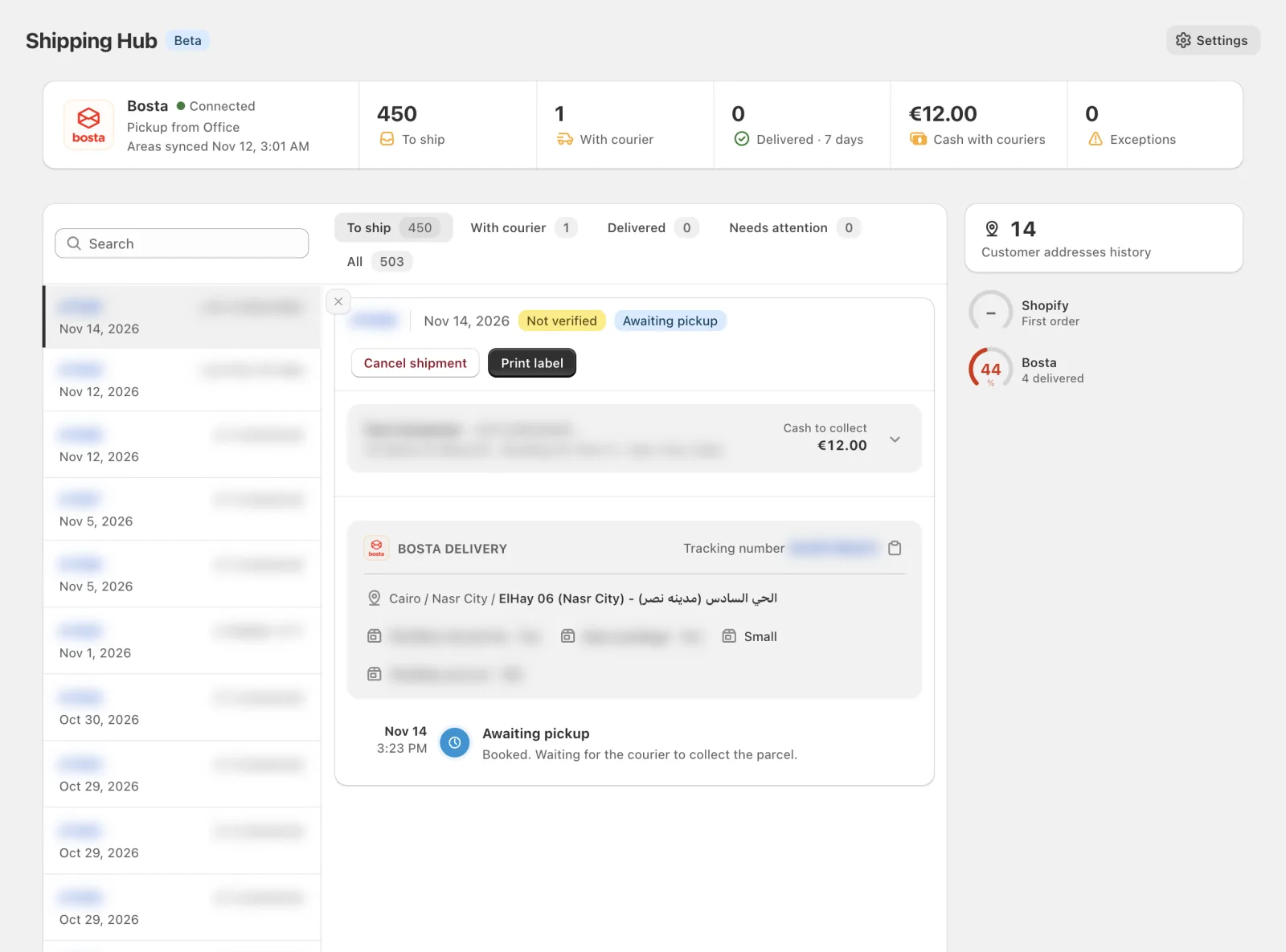
Shipping Hub does not schedule pickups; arrange those with Bosta as you do today. While a parcel is Awaiting pickup, you can cancel it from Cartsaver; the Shopify order returns to unfulfilled (on by default), and Ship again books a new attempt.
How does tracking reach Shopify and WhatsApp?
When you book, Cartsaver fulfils the Shopify order by default with Bosta as the carrier, the tracking number and Bosta’s tracking link. Bosta’s status updates (in transit, out for delivery, delivered, a failed attempt, returned) are added to that fulfilment, and Cartsaver checks every few hours for any update it missed.
Because the tracking link is on the Shopify fulfilment, Cartsaver’s WhatsApp auto-reply can share the Bosta tracking number and link when a customer asks where their order is.
A strip at the top of Shipping Hub shows orders to ship, parcels with the courier, parcels delivered in the last 7 days with your delivery rate over 30 days, the cash with couriers on parcels still out, and exceptions. Cash with couriers is what is still to be collected; payouts stay in your Bosta account.
How does Shipping Hub fit with WhatsApp order confirmation?
Every cash on delivery order in Shipping Hub shows Verified or Not verified from Cartsaver’s own order verification, next to the customer delivery score. You see whether Cartsaver verified the order, and the customer’s delivery history, before you book. Neither blocks shipping; the decision stays yours.
The earlier checks are covered in one-tap WhatsApp order confirmation and fake COD order protection, which flags or cancels orders nobody confirms. For the wider picture, read COD e-commerce best practices for Egypt.
What are the limits during the Beta?
During the Beta, Shipping Hub books deliveries only, to addresses in Egypt, with Bosta as the one courier. Cash on delivery is capped at Bosta’s limit per parcel. There is no test mode, so every booking is a real Bosta delivery.
- Egypt and Bosta. Deliveries to addresses in Egypt, with Bosta, one courier connection at a time.
- Cash per parcel. Bosta’s limit is 30,000 EGP cash on delivery per parcel; Cartsaver stops a larger booking before it reaches Bosta.
- Real bookings. Every booking creates a real Bosta delivery; cancel it before pickup if you booked by mistake.
- Deliveries only. No return or exchange bookings, and the Shopify order note is not sent to Bosta.
To try it, install Cartsaver from the Shopify App Store, open Shipping Hub and connect Bosta. See the Shipping Hub feature breakdown for a summary.
Frequently asked questions
Does Cartsaver deliver my parcels?
No. Cartsaver is not a courier. Shipping Hub is an integration with Bosta: you book Bosta deliveries from Cartsaver, and Bosta picks up, delivers and collects the cash under your own Bosta account and contract. Cartsaver sends the booking, prints the airway bills and manifest, and keeps the Shopify order up to date.
Which Shopify app confirms COD orders on WhatsApp and books Bosta deliveries?
Cartsaver does both in one app. It confirms cash on delivery orders on WhatsApp or SMS, then Shipping Hub books the order with Bosta, prints the airway bill and adds tracking to the Shopify order. Bosta delivers and collects the cash under your own contract with Bosta.
Which Cartsaver plans include Shipping Hub?
Shipping Hub is included on every Cartsaver plan, including Free. Bosta’s delivery fees are not part of your Cartsaver plan: they follow your own contract with Bosta, whichever Cartsaver plan you are on. Install Cartsaver, open Shipping Hub and connect your Bosta account to start.
Does Shipping Hub send every Shopify order to Bosta automatically?
No. You book each order yourself from the To ship tab, so nothing reaches Bosta until you choose to ship it. Ship and move to next order books in the background and opens the next order, which keeps a long queue quick while every booking stays your decision.
Do I have to sign in to my Bosta dashboard?
No. The API key is enough to book, print and track. Signing in with your Bosta dashboard account is optional and turns on the Bosta part of the customer delivery score, plus the addresses Bosta has delivered to for that customer. Shipping never depends on it, and the store gauge works without it.
Can I book an order the customer has not confirmed?
Yes. Shipping Hub shows whether Cartsaver verified the order and how the customer’s past deliveries went, but it never blocks a booking. An unverified order is marked Not verified, so you can call the customer first, or book it anyway if you know them. The decision stays with you.
Does the Shopify Bosta integration work outside Egypt?
Not for now. Shipping Hub books Bosta deliveries to addresses in Egypt, and Bosta is the one courier available during the Beta. An order going to another country shows that no connected courier delivers there. WhatsApp order confirmation works outside Egypt too.