
The “Post-Confirmation” Goldmine Most Shopify merchants in COD-heavy markets like India or Egypt think the journey ends once a customer clicks “Confirm.” In reality, that is the moment of maximum engagement. The customer is already on WhatsApp, they’ve just verified their intent to buy, and their trust in your brand is at its peak.
Cartsaver’s Smart Cross-Sell allows you to capitalize on this “Yes” state of mind by suggesting additional products directly in the chat.
3 Ways to Strategy Your Cross-Sells
Inside the Cartsaver Cross-Sell tab, you have total control over what your customers see after they confirm their order:
- Shopify Recommendations: Let Shopify’s algorithm do the heavy lifting. By selecting “Related” or “Complementary” products, the app automatically suggests items that pair perfectly with what the customer just bought (e.g., suggesting socks to someone who just bought shoes).
- The Manual “Hero” Strategy: Have a high-margin product or a new arrival you want everyone to see? Use the Manual Selection data source to push specific items to every customer who confirms an order.
- The Collection Push: Running a clearance on a specific category? Set the data source to a specific Shopify Collection to clear out inventory while increasing your order value
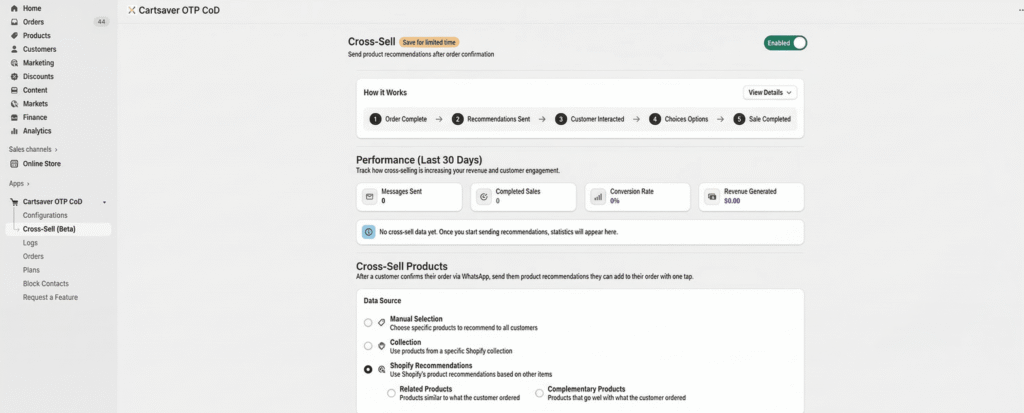
The Cartsaver Cross-Sell dashboard allows you to choose between Manual, Collection, or AI-based recommendations
How the Customer Experiences It
The beauty of Cartsaver is that the customer never has to leave WhatsApp to browse your upsells. The flow is frictionless:
- Step 1: Customer taps [✅ Confirm] on their original order.
- Step 2: Cartsaver instantly sends a “You might also love these” message with product cards.
- Step 3: The customer can “Choose Options” (like size or color) and add to their order with one tap.
Tracking Your “Found Money”
You don’t have to guess if it’s working. The Performance Dashboard tracks every cent generated by these automated upsells. You can monitor:
- Messages Sent: How many cross-sell opportunities were created.
- Conversion Rate: The percentage of customers who added items to their order.
- Revenue Generated: The exact “extra” profit Cartsaver has earned for your store.
Pro-Tip: Keep it Complementary
To maintain high conversion rates, stick to Complementary Products. Suggesting a $10 phone case to someone who bought a $500 phone is an easy “Yes.” Suggesting another $500 phone is usually a “No.”